

Sub Flows
Reader Always On
This configuration is relevant for peripherals that want to start the transaction with product selection (PreSelection flow) but don’t have a way to start a transaction from the peripheral- meaning they want the transaction process to be initiated from a consumer selecting a product on Nayax’s device’s screen, which would then trigger the peripheral to send the product’s details. In rare cases, a consumer’s card presentation can trigger the peripheral to send the product selection, but, as mentioned, this option is not very common.Always Idle
The transaction starts with the consumer selecting a product (PreSelection flow) on the peripheral, which then sends the “Vend request” command without waiting for a “Begin Session” trigger (the “Vend request”). This flow is very commonly used in the Far East.Brand Selection and the Dynamic QR Channel URL
Always Idle is also what makes the brand selection screen possible. Regular PreSelection shows animations once a product is selected and cannot display brands, so the device has to be configured to Always Idle for brands to appear at all. After a product is selected, the brand or channel and its QR code appear on the device screen and in the SDK log. The string is logged in hexadecimal, so convert it to ASCII to read the URL.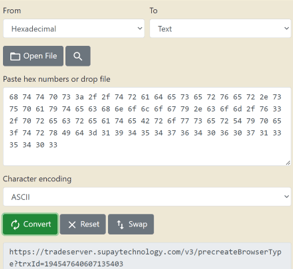
Features
Transfer Data
A command which provides information during the transaction process regarding the transaction details- Nayax’s transaction ID and the consumer’s card details: For credit card- Bin, PAN-HASH, last 4 digits. For proprietary cards- UID (unique ID, the card’s full number). The card details information is sent automatically once a consumer has presented his card and the authorization’s result has been received.Transfer Data also presents the optional feature of having the peripheral to send its own transaction ID in order for it to appear in the SDK’s logs (no other use is done with that information).
More on Transfer Data in the Transfer Data page.
Display Control
A feature for peripherals that requires the Marshall master to define different selection screens on the device before sending a request for a specific price. This way, the product selection comes from Nayax’s device instead of the peripheral, and is helpful in cases in which the peripheral has no screen or way for consumers to select a product on its end. More on that in the Display Control page.eReceipt
A feature that would enable a digital receipt file to be generated on the device’s end (as well as have the file’s link be sent to the peripheral via the SDK) via a QR code once the transaction has been settled. To enable said feature, you should set the following configurations in Nayax Core: • Payment tab -> Transaction Options -> Enable eReceipt on Transaction end - V • Receipt Button Display Duration - 20 • Receipt QR Display Duration - 40 • Vend Flow Options - Dynamic Receipt In older SDK versions, the URL was stored in hex, so to parse it, you should convert it to ASCII. On newer ones, it would appear something as follows:C
Keeping the eReceipt Product Name From Showing as “Unknown”
Product names on the eReceipt come from the product map, so a product code with no matching row shows up asunknown. Create a row for each product code your integration sends and give it a name.
Marshall itself never reads the product map, so nothing else in that row affects the transaction flow, prices included. The product name is the only field that matters to you, and it appears in Last Sales and in the eReceipt file. For how to add a row, see Nayax Core Operations.
Info Session
An informative non-vending session that provides the peripheral with the consumer’s card details upon their card presentation. The consumer is not charged (is notified via “card read successfully”), and the transaction ends with “Vend Denied” (since there is no actual authorization, nor is there a need to proceed to the vending process).Used chiefly for consumer re-identification by having the consumer present the same card he used to start the transaction.
Usually relevant for rentals and EV chargers.
Important note: This feature requires the peripheral to have a screen/a way to distinguish between a vending session and info session, as it’s up for the peripheral to know which type of session to initiate.
Incremental Authorization
Incremental authorizations can be used to increase the total amount authorized when the estimate/initial authorization is insufficient. An incremental authorization request may also be based on a revised estimate of the cardholder’s spending. Incremental authorizations do not replace the original approval, they are additional to previously authorized amounts. The sum of all linked estimated and incremental authorizations represents the Total amount permitted for a given transaction.Supported billing providersAs of February 2026, the only billing providers which support this feature are Heartland (US), Chase (US), Credorax (Europe), First Data (Australia), Adyen (US and also Europe). Should your devices have any other billing provider set up- Incremental Authorization won’t work.
How Incremental Authorization Works
The incremental feature has 2 “Default Credit” parameters- the regular one and “Maximum Default Credit”. The regular default credit is the one that the consumer would initially be authorized for, just like in any PreAuthorization transaction you’re familiar with (if there is not sufficient credit for the Default Credit the transaction would be cancelled on this step). Should the consumer take items worth less than the Default Credit amount, the consumer would only be charged for those items (as per usual).An example of using Incremental Authorization:
Default Credit of 10.00$ (if using Multisession+price not final flow- that would be the price of Vend Request instead of Default Credit in the following example), Maximum Default Credit of 50.00$:Should the consumer take items worth more than the Default Credit amount but less than the Maximum Default Credit amount (for example, items worth 17.00$), the device would go through a 2nd authorization process for the difference between the “final price” and the Default Credit amount (7.00$):
- Should the 2nd authorization be approved, the consumer would be charged for the desired amount (17.00$). It would look something like this in Last Sales (one line record, in which the settlement amount is higher than the authorization amount):

- Should the 2nd authorization fail- the consumer would only be charged for the amount of the first authorization, meaning of the Default Credit (10.00$). In such a case, the risk is on the machine’s operator, meaning the loss of the 2nd authorization being failed would be on his end.