

Set Up the MCP Server
Connect your AI assistant to Nayax documentation for instant answers.
Transaction Flow Components
Cortina API sits at the center of the payment flow and ensures each transaction is valid, secure, and fully processed.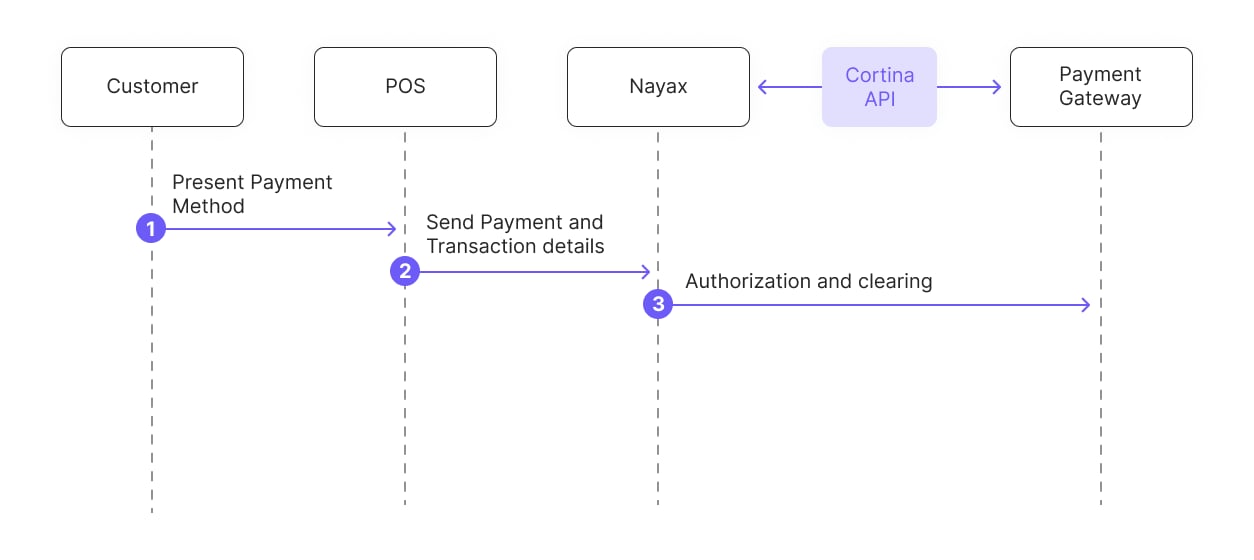
- Customer: Customers initiate payment by presenting their payment method at the POS (Point of Sale) terminal.
- POS (Point of Sale): The POS terminal receives the credit card details and the transaction amount. It then sends the card and transaction details to the Nayax server for further processing.
- Nayax: Nayax receives the payment request and uses the Cortina API to verify the transaction. The API handles the transaction’s authentication, authorization, and final settlement.
- Payment Gateway: The Payment Gateway processes transaction details, authorizes payments, and clears funds.
See Also
See the following pages to learn more about Cortina’s payment methods and its integration and support resources.Payment Methods
Cortina supports four payment methods, each with its own transaction flow.Prepaid Card
Process prepaid card transactions using pre-selection or pre-authorization flows.
Credit Card
Process credit card payments through pre-selection or pre-authorization flows.
StaticQR
Process wallet payments when customers scan a static QR code on the machine.
DynamicQR
Process QR payments using a unique code generated for each transaction.
Integration & Support
These pages cover the integration process, authentication, and other supporting resources for your Cortina integration.Integration Process
Follow Cortina’s staged integration process from kickoff through the production pilot.
Authentication Process
Encrypt and exchange tokens to authenticate each Cortina transaction session.
Network Requirements
Set up HTTPS or VPN connectivity and whitelist Nayax’s IP addresses.
Sale End Notification
Notify your system when a Cortina transaction reaches completion.
Refunds
Return funds to customers for eligible transactions with full or partial refunds.
Cortina FAQs
Find quick answers to common questions about Cortina integration, payments, and QR setups.