

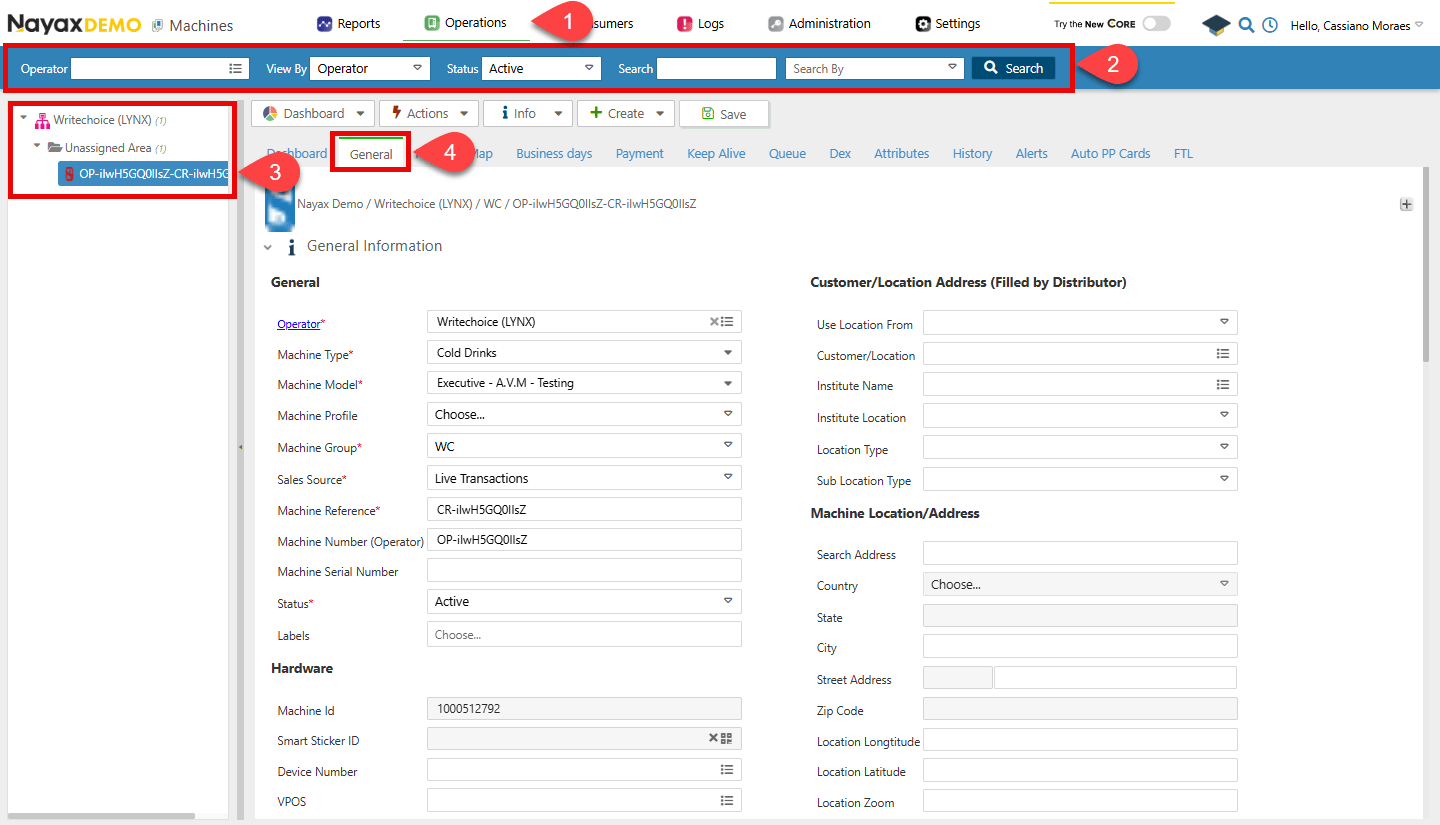
- In your Dashboard, go to Operations > Machines.
- Use the search function to filter through the list of machines.
- Select the desired machine from the list.
- Open the General Information tab.
Retrieve a machine by MachineID
Use the Get Specific Machine Basic Info endpoint to retrieve the details of a machine with a specific MachineID. Insert the MachineID in the path parameter of the request.
Retrieve a machine by DeviceSerialNumber
Use the Get Specific Machine Basic Info by Device endpoint to retrieve the details of a machine associated with a specific DeviceSerialNumber. Insert the DeviceSerialNumber in the path parameter of the request.
Retrieve a machine by VPOSSerial
Use the Get Specific Machine Basic Info by VPOS endpoint to retrieve the details of a machine associated with a specific VPOSSerial. Insert the VPOSSerial in the path parameter of the request.
Retrieve all machine basic info
Use the Get All Machine Basic Info endpoint to retrieve basic information for all machines, with optional filtering by the query parameters listed below.Request