> ## Documentation Index
> Fetch the complete documentation index at: https://nayax-44d6e37b-docs-marshall-faq-redistribution.mintlify.site/llms.txt
> Use this file to discover all available pages before exploring further.
# Retrieve Machine Information
export const EndpointCard = ({method = "API", title, children, href, arrow = true}) => {
const METHOD_STYLES = {
GET: {
bg: "mint-bg-green-400/20 dark:mint-bg-green-400/20",
text: "mint-text-green-700 dark:mint-text-green-400",
border: "mint-border-green-300 dark:mint-border-green-700"
},
POST: {
bg: "mint-bg-blue-400/20 dark:mint-bg-blue-400/20",
text: "mint-text-blue-700 dark:mint-text-blue-400"
},
PUT: {
bg: "mint-bg-yellow-400/20 dark:mint-bg-yellow-400/20",
text: "mint-text-yellow-700 dark:mint-text-yellow-400"
},
PATCH: {
bg: "mint-bg-orange-400/20 dark:mint-bg-orange-400/20",
text: "mint-text-orange-700 dark:mint-text-orange-400"
},
DELETE: {
bg: "mint-bg-red-400/20 dark:mint-bg-red-400/20",
text: "mint-text-red-700 dark:mint-text-red-400"
},
API: {
bg: "mint-bg-black",
text: "mint-text-white"
}
};
const MethodBadge = ({method}) => {
const style = METHOD_STYLES[method?.toUpperCase()] ?? METHOD_STYLES.GET;
return
{method?.toUpperCase()}
;
};
const content =
{}
{title}
{children &&
{children}
}
{}
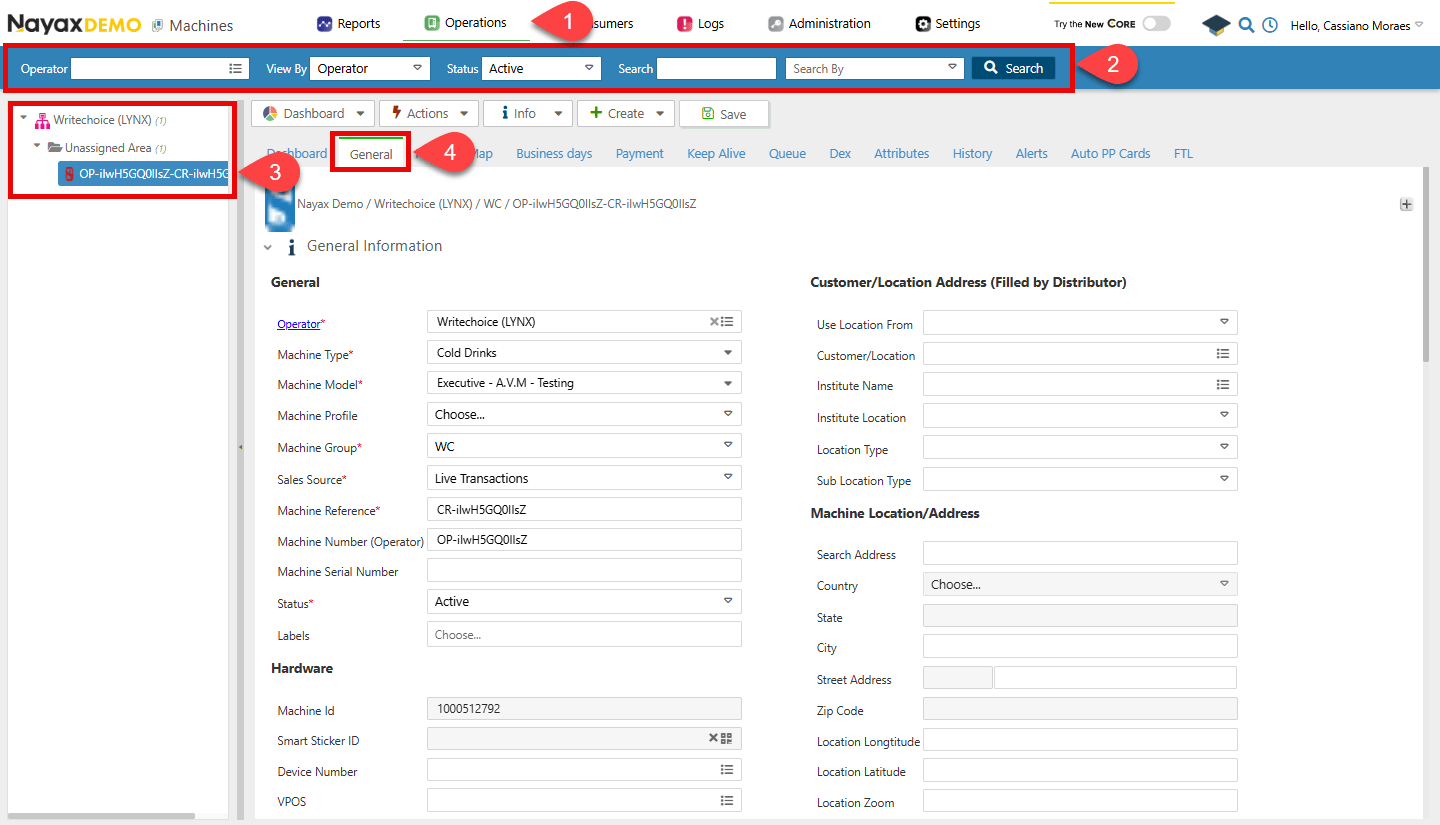 You can see all the key information about the machine you may need for other requests there.
**Authentication**
Refer to the [Security & Token](/docs/manage-data-operations/lynx-api/security) page of this documentation to learn how to access your tokens, and how to properly use it to authenticate your API requests.
The Lynx API provides four methods to retrieve machine information programmatically. Use the section that matches the identifier you have available.
## Retrieve a machine by `MachineID`
Use the [Get Specific Machine Basic Info](/reference/lynx/machines/get-specific-machine-basic-info) endpoint to retrieve the details of a machine with a specific `MachineID`. Insert the `MachineID` in the path parameter of the request.
```sh Request theme={null}
curl --request GET \
--url https://qa-lynx.nayax.com/operational/v1/machines/{MachineID} \
--header 'Authorization: Bearer ' \
--header 'accept: application/json'
```
```json Response theme={null}
{
"MachineID": 0,
"ActorID": 0,
"CountryID": 0,
"CurrencyID": 0,
"InstituteID": 0,
"LocationID": 0,
"MachineGroupID": 0,
"MachineModelID": 0,
"MachineName": "string",
"MachineNumber": "string",
"MachineStatusBit": 0,
"LanguageID": 2,
"OperatorActorID": 0,
"DistributorActorID": 0,
"AreaActorID": 0,
"SalesSourceID": 0,
"MachineTypeID": 555001,
"SerialNumber": "string",
"VPOSSerialNumber": "string",
"DeviceSerialNumber": "string",
"VPOSID": 0,
"DeviceID": 0,
"UseLocationFrom": 0,
"GeoCountry": 0,
"GeoState": "string",
"GeoCity": "string",
"GeoAddress": "string",
"GeoStreetNumber": "string",
"GeoLongitude": 0,
"GeoLatitude": 0,
"GeoZoom": 0,
"GeoZipCode": "string",
"SearchAddress": "string",
"Remarks": "string",
"DexType": 0,
"DexMidnightReadsEnableBit": true,
"DexG85CheckEnableBit": true,
"DexDivideBillsBy": 0,
"DexG85CheckParsingFilterEnableBit": true,
"UseCardPriceCorrectCashPriceBit": true,
"MachineTimeZoneOffset": 0,
"DexReadInterval": 0,
"LocationType": 0,
"ApplyDisplayPickListSelectionsToReportsBit": true,
"DisplayPickListSelectionsAs": 0,
"LastUpdated": "2024-11-25T14:04:50.909Z",
"MachineProfile": 0,
"CityID": 0,
"RegionID": 0,
"CountryDialingCode": 0,
"DexIgnoreCRCCheckBit": true,
"DexParseLABit": true,
"ProductMapID": 0,
"Longitude": 0,
"Latitude": 0,
"DexTotalSalesMinusCardSalesBit": true,
"RouteActorID": 0,
"MachineLogicAlertEnableBit": true,
"AlertRuleSetId": 0,
"MachineMemberTypePricingEnableBit": true,
"DexMultiplyCoinsBy": 0,
"DexMultiplyTubesBy": 0,
"CustomerID": 0,
"CommissionType": 0,
"CommissionDefaultValue": 0,
"CreatedBy": 0,
"CreatedOn": "2024-11-25T14:04:50.909Z",
"UpdateBy": 0,
"TubeSource": 0,
"BillSource": 0,
"SmartStickerId": 0,
"EnableRemoveVendBit": true,
"EnableEreceiptBit": true,
"ProductMapAutomaticCreationBit": true,
"Refs": {
"additionalProp": "string"
}
}
```
## Retrieve a machine by `DeviceSerialNumber`
Use the [Get Specific Machine Basic Info by Device](/reference/lynx/machines/get-specific-machine-basic-info-by-device) endpoint to retrieve the details of a machine associated with a specific `DeviceSerialNumber`. Insert the `DeviceSerialNumber` in the path parameter of the request.
```sh Request theme={null}
curl --request GET \
--url https://qa-lynx.nayax.com/operational/v1/devices/{DeviceSerialNumber}/machine \
--header 'Authorization: Bearer ' \
--header 'accept: application/json'
```
```json Response theme={null}
{
"MachineID": 0,
"ActorID": 0,
"CountryID": 0,
"CurrencyID": 0,
"InstituteID": 0,
"LocationID": 0,
"MachineGroupID": 0,
"MachineModelID": 0,
"MachineName": "string",
"MachineNumber": "string",
"MachineStatusBit": 0,
"LanguageID": 2,
"OperatorActorID": 0,
"DistributorActorID": 0,
"AreaActorID": 0,
"SalesSourceID": 0,
"MachineTypeID": 555001,
"SerialNumber": "string",
"VPOSSerialNumber": "string",
"DeviceSerialNumber": "string",
"VPOSID": 0,
"DeviceID": 0,
"UseLocationFrom": 0,
"GeoCountry": 0,
"GeoState": "string",
"GeoCity": "string",
"GeoAddress": "string",
"GeoStreetNumber": "string",
"GeoLongitude": 0,
"GeoLatitude": 0,
"GeoZoom": 0,
"GeoZipCode": "string",
"SearchAddress": "string",
"Remarks": "string",
"DexType": 0,
"DexMidnightReadsEnableBit": true,
"DexG85CheckEnableBit": true,
"DexDivideBillsBy": 0,
"DexG85CheckParsingFilterEnableBit": true,
"UseCardPriceCorrectCashPriceBit": true,
"MachineTimeZoneOffset": 0,
"DexReadInterval": 0,
"LocationType": 0,
"ApplyDisplayPickListSelectionsToReportsBit": true,
"DisplayPickListSelectionsAs": 0,
"LastUpdated": "2024-11-25T14:04:50.909Z",
"MachineProfile": 0,
"CityID": 0,
"RegionID": 0,
"CountryDialingCode": 0,
"DexIgnoreCRCCheckBit": true,
"DexParseLABit": true,
"ProductMapID": 0,
"Longitude": 0,
"Latitude": 0,
"DexTotalSalesMinusCardSalesBit": true,
"RouteActorID": 0,
"MachineLogicAlertEnableBit": true,
"AlertRuleSetId": 0,
"MachineMemberTypePricingEnableBit": true,
"DexMultiplyCoinsBy": 0,
"DexMultiplyTubesBy": 0,
"CustomerID": 0,
"CommissionType": 0,
"CommissionDefaultValue": 0,
"CreatedBy": 0,
"CreatedOn": "2024-11-25T14:04:50.909Z",
"UpdateBy": 0,
"TubeSource": 0,
"BillSource": 0,
"SmartStickerId": 0,
"EnableRemoveVendBit": true,
"EnableEreceiptBit": true,
"ProductMapAutomaticCreationBit": true,
"Refs": {
"additionalProp": "string"
}
}
```
## Retrieve a machine by `VPOSSerial`
Use the [Get Specific Machine Basic Info by VPOS](/reference/lynx/machines/get-specific-machine-basic-info-by-vpos) endpoint to retrieve the details of a machine associated with a specific `VPOSSerial`. Insert the `VPOSSerial` in the path parameter of the request.
```sh Request theme={null}
curl --request GET \
--url https://qa-lynx.nayax.com/operational/v1/vpos/{VPOSSerial}/machine \
--header 'Authorization: Bearer ' \
--header 'accept: application/json'
```
```json Response theme={null}
{
"MachineID": 0,
"ActorID": 0,
"CountryID": 0,
"CurrencyID": 0,
"InstituteID": 0,
"LocationID": 0,
"MachineGroupID": 0,
"MachineModelID": 0,
"MachineName": "string",
"MachineNumber": "string",
"MachineStatusBit": 0,
"LanguageID": 2,
"OperatorActorID": 0,
"DistributorActorID": 0,
"AreaActorID": 0,
"SalesSourceID": 0,
"MachineTypeID": 555001,
"SerialNumber": "string",
"VPOSSerialNumber": "string",
"DeviceSerialNumber": "string",
"VPOSID": 0,
"DeviceID": 0,
"UseLocationFrom": 0,
"GeoCountry": 0,
"GeoState": "string",
"GeoCity": "string",
"GeoAddress": "string",
"GeoStreetNumber": "string",
"GeoLongitude": 0,
"GeoLatitude": 0,
"GeoZoom": 0,
"GeoZipCode": "string",
"SearchAddress": "string",
"Remarks": "string",
"DexType": 0,
"DexMidnightReadsEnableBit": true,
"DexG85CheckEnableBit": true,
"DexDivideBillsBy": 0,
"DexG85CheckParsingFilterEnableBit": true,
"UseCardPriceCorrectCashPriceBit": true,
"MachineTimeZoneOffset": 0,
"DexReadInterval": 0,
"LocationType": 0,
"ApplyDisplayPickListSelectionsToReportsBit": true,
"DisplayPickListSelectionsAs": 0,
"LastUpdated": "2024-11-25T14:04:50.909Z",
"MachineProfile": 0,
"CityID": 0,
"RegionID": 0,
"CountryDialingCode": 0,
"DexIgnoreCRCCheckBit": true,
"DexParseLABit": true,
"ProductMapID": 0,
"Longitude": 0,
"Latitude": 0,
"DexTotalSalesMinusCardSalesBit": true,
"RouteActorID": 0,
"MachineLogicAlertEnableBit": true,
"AlertRuleSetId": 0,
"MachineMemberTypePricingEnableBit": true,
"DexMultiplyCoinsBy": 0,
"DexMultiplyTubesBy": 0,
"CustomerID": 0,
"CommissionType": 0,
"CommissionDefaultValue": 0,
"CreatedBy": 0,
"CreatedOn": "2024-11-25T14:04:50.909Z",
"UpdateBy": 0,
"TubeSource": 0,
"BillSource": 0,
"SmartStickerId": 0,
"EnableRemoveVendBit": true,
"EnableEreceiptBit": true,
"ProductMapAutomaticCreationBit": true,
"Refs": {
"additionalProp": "string"
}
}
```
## Retrieve all machine basic info
Use the [Get All Machine Basic Info](/reference/lynx/machines/get-all-machine-basic-info) endpoint to retrieve basic information for all machines, with optional filtering by the query parameters listed below.
```sh Request theme={null}
curl --request GET \
--url https://qa-lynx.nayax.com/operational/v1/machines \
--header 'Authorization: Bearer ' \
--header 'accept: application/json'
```
| **Parameter** | `Type` | Description |
| ----------------------- | -------- | ------------------------------------------------------------------------------------- |
| **ResultsLimit** | `int32` | The maximum number of results to return; it is set to 100 by default. |
| **ResultsOffset** | `int32` | The number of results to skip before starting to return results; set to 0 by default. |
| **ActorID** | `int64` | Filter results by the actor ID associated with the machine. |
| **OperatorIdentifier** | `string` | Filter results by the operator identifier. |
| **MachineID** | `int64` | Filter results by the machine ID. |
| **MachineSerialNumber** | `string` | Filter results by the machine's serial number. |
| **MachineName** | `string` | Filter results by the machine's name. |
| **DeviceID** | `int32` | Filter results by the device ID associated with the machine. |
| **VposID** | `int64` | Filter results by the VPOS ID associated with the machine. |
You can see all the key information about the machine you may need for other requests there.
**Authentication**
Refer to the [Security & Token](/docs/manage-data-operations/lynx-api/security) page of this documentation to learn how to access your tokens, and how to properly use it to authenticate your API requests.
The Lynx API provides four methods to retrieve machine information programmatically. Use the section that matches the identifier you have available.
## Retrieve a machine by `MachineID`
Use the [Get Specific Machine Basic Info](/reference/lynx/machines/get-specific-machine-basic-info) endpoint to retrieve the details of a machine with a specific `MachineID`. Insert the `MachineID` in the path parameter of the request.
```sh Request theme={null}
curl --request GET \
--url https://qa-lynx.nayax.com/operational/v1/machines/{MachineID} \
--header 'Authorization: Bearer ' \
--header 'accept: application/json'
```
```json Response theme={null}
{
"MachineID": 0,
"ActorID": 0,
"CountryID": 0,
"CurrencyID": 0,
"InstituteID": 0,
"LocationID": 0,
"MachineGroupID": 0,
"MachineModelID": 0,
"MachineName": "string",
"MachineNumber": "string",
"MachineStatusBit": 0,
"LanguageID": 2,
"OperatorActorID": 0,
"DistributorActorID": 0,
"AreaActorID": 0,
"SalesSourceID": 0,
"MachineTypeID": 555001,
"SerialNumber": "string",
"VPOSSerialNumber": "string",
"DeviceSerialNumber": "string",
"VPOSID": 0,
"DeviceID": 0,
"UseLocationFrom": 0,
"GeoCountry": 0,
"GeoState": "string",
"GeoCity": "string",
"GeoAddress": "string",
"GeoStreetNumber": "string",
"GeoLongitude": 0,
"GeoLatitude": 0,
"GeoZoom": 0,
"GeoZipCode": "string",
"SearchAddress": "string",
"Remarks": "string",
"DexType": 0,
"DexMidnightReadsEnableBit": true,
"DexG85CheckEnableBit": true,
"DexDivideBillsBy": 0,
"DexG85CheckParsingFilterEnableBit": true,
"UseCardPriceCorrectCashPriceBit": true,
"MachineTimeZoneOffset": 0,
"DexReadInterval": 0,
"LocationType": 0,
"ApplyDisplayPickListSelectionsToReportsBit": true,
"DisplayPickListSelectionsAs": 0,
"LastUpdated": "2024-11-25T14:04:50.909Z",
"MachineProfile": 0,
"CityID": 0,
"RegionID": 0,
"CountryDialingCode": 0,
"DexIgnoreCRCCheckBit": true,
"DexParseLABit": true,
"ProductMapID": 0,
"Longitude": 0,
"Latitude": 0,
"DexTotalSalesMinusCardSalesBit": true,
"RouteActorID": 0,
"MachineLogicAlertEnableBit": true,
"AlertRuleSetId": 0,
"MachineMemberTypePricingEnableBit": true,
"DexMultiplyCoinsBy": 0,
"DexMultiplyTubesBy": 0,
"CustomerID": 0,
"CommissionType": 0,
"CommissionDefaultValue": 0,
"CreatedBy": 0,
"CreatedOn": "2024-11-25T14:04:50.909Z",
"UpdateBy": 0,
"TubeSource": 0,
"BillSource": 0,
"SmartStickerId": 0,
"EnableRemoveVendBit": true,
"EnableEreceiptBit": true,
"ProductMapAutomaticCreationBit": true,
"Refs": {
"additionalProp": "string"
}
}
```
## Retrieve a machine by `DeviceSerialNumber`
Use the [Get Specific Machine Basic Info by Device](/reference/lynx/machines/get-specific-machine-basic-info-by-device) endpoint to retrieve the details of a machine associated with a specific `DeviceSerialNumber`. Insert the `DeviceSerialNumber` in the path parameter of the request.
```sh Request theme={null}
curl --request GET \
--url https://qa-lynx.nayax.com/operational/v1/devices/{DeviceSerialNumber}/machine \
--header 'Authorization: Bearer ' \
--header 'accept: application/json'
```
```json Response theme={null}
{
"MachineID": 0,
"ActorID": 0,
"CountryID": 0,
"CurrencyID": 0,
"InstituteID": 0,
"LocationID": 0,
"MachineGroupID": 0,
"MachineModelID": 0,
"MachineName": "string",
"MachineNumber": "string",
"MachineStatusBit": 0,
"LanguageID": 2,
"OperatorActorID": 0,
"DistributorActorID": 0,
"AreaActorID": 0,
"SalesSourceID": 0,
"MachineTypeID": 555001,
"SerialNumber": "string",
"VPOSSerialNumber": "string",
"DeviceSerialNumber": "string",
"VPOSID": 0,
"DeviceID": 0,
"UseLocationFrom": 0,
"GeoCountry": 0,
"GeoState": "string",
"GeoCity": "string",
"GeoAddress": "string",
"GeoStreetNumber": "string",
"GeoLongitude": 0,
"GeoLatitude": 0,
"GeoZoom": 0,
"GeoZipCode": "string",
"SearchAddress": "string",
"Remarks": "string",
"DexType": 0,
"DexMidnightReadsEnableBit": true,
"DexG85CheckEnableBit": true,
"DexDivideBillsBy": 0,
"DexG85CheckParsingFilterEnableBit": true,
"UseCardPriceCorrectCashPriceBit": true,
"MachineTimeZoneOffset": 0,
"DexReadInterval": 0,
"LocationType": 0,
"ApplyDisplayPickListSelectionsToReportsBit": true,
"DisplayPickListSelectionsAs": 0,
"LastUpdated": "2024-11-25T14:04:50.909Z",
"MachineProfile": 0,
"CityID": 0,
"RegionID": 0,
"CountryDialingCode": 0,
"DexIgnoreCRCCheckBit": true,
"DexParseLABit": true,
"ProductMapID": 0,
"Longitude": 0,
"Latitude": 0,
"DexTotalSalesMinusCardSalesBit": true,
"RouteActorID": 0,
"MachineLogicAlertEnableBit": true,
"AlertRuleSetId": 0,
"MachineMemberTypePricingEnableBit": true,
"DexMultiplyCoinsBy": 0,
"DexMultiplyTubesBy": 0,
"CustomerID": 0,
"CommissionType": 0,
"CommissionDefaultValue": 0,
"CreatedBy": 0,
"CreatedOn": "2024-11-25T14:04:50.909Z",
"UpdateBy": 0,
"TubeSource": 0,
"BillSource": 0,
"SmartStickerId": 0,
"EnableRemoveVendBit": true,
"EnableEreceiptBit": true,
"ProductMapAutomaticCreationBit": true,
"Refs": {
"additionalProp": "string"
}
}
```
## Retrieve a machine by `VPOSSerial`
Use the [Get Specific Machine Basic Info by VPOS](/reference/lynx/machines/get-specific-machine-basic-info-by-vpos) endpoint to retrieve the details of a machine associated with a specific `VPOSSerial`. Insert the `VPOSSerial` in the path parameter of the request.
```sh Request theme={null}
curl --request GET \
--url https://qa-lynx.nayax.com/operational/v1/vpos/{VPOSSerial}/machine \
--header 'Authorization: Bearer ' \
--header 'accept: application/json'
```
```json Response theme={null}
{
"MachineID": 0,
"ActorID": 0,
"CountryID": 0,
"CurrencyID": 0,
"InstituteID": 0,
"LocationID": 0,
"MachineGroupID": 0,
"MachineModelID": 0,
"MachineName": "string",
"MachineNumber": "string",
"MachineStatusBit": 0,
"LanguageID": 2,
"OperatorActorID": 0,
"DistributorActorID": 0,
"AreaActorID": 0,
"SalesSourceID": 0,
"MachineTypeID": 555001,
"SerialNumber": "string",
"VPOSSerialNumber": "string",
"DeviceSerialNumber": "string",
"VPOSID": 0,
"DeviceID": 0,
"UseLocationFrom": 0,
"GeoCountry": 0,
"GeoState": "string",
"GeoCity": "string",
"GeoAddress": "string",
"GeoStreetNumber": "string",
"GeoLongitude": 0,
"GeoLatitude": 0,
"GeoZoom": 0,
"GeoZipCode": "string",
"SearchAddress": "string",
"Remarks": "string",
"DexType": 0,
"DexMidnightReadsEnableBit": true,
"DexG85CheckEnableBit": true,
"DexDivideBillsBy": 0,
"DexG85CheckParsingFilterEnableBit": true,
"UseCardPriceCorrectCashPriceBit": true,
"MachineTimeZoneOffset": 0,
"DexReadInterval": 0,
"LocationType": 0,
"ApplyDisplayPickListSelectionsToReportsBit": true,
"DisplayPickListSelectionsAs": 0,
"LastUpdated": "2024-11-25T14:04:50.909Z",
"MachineProfile": 0,
"CityID": 0,
"RegionID": 0,
"CountryDialingCode": 0,
"DexIgnoreCRCCheckBit": true,
"DexParseLABit": true,
"ProductMapID": 0,
"Longitude": 0,
"Latitude": 0,
"DexTotalSalesMinusCardSalesBit": true,
"RouteActorID": 0,
"MachineLogicAlertEnableBit": true,
"AlertRuleSetId": 0,
"MachineMemberTypePricingEnableBit": true,
"DexMultiplyCoinsBy": 0,
"DexMultiplyTubesBy": 0,
"CustomerID": 0,
"CommissionType": 0,
"CommissionDefaultValue": 0,
"CreatedBy": 0,
"CreatedOn": "2024-11-25T14:04:50.909Z",
"UpdateBy": 0,
"TubeSource": 0,
"BillSource": 0,
"SmartStickerId": 0,
"EnableRemoveVendBit": true,
"EnableEreceiptBit": true,
"ProductMapAutomaticCreationBit": true,
"Refs": {
"additionalProp": "string"
}
}
```
## Retrieve all machine basic info
Use the [Get All Machine Basic Info](/reference/lynx/machines/get-all-machine-basic-info) endpoint to retrieve basic information for all machines, with optional filtering by the query parameters listed below.
```sh Request theme={null}
curl --request GET \
--url https://qa-lynx.nayax.com/operational/v1/machines \
--header 'Authorization: Bearer ' \
--header 'accept: application/json'
```
| **Parameter** | `Type` | Description |
| ----------------------- | -------- | ------------------------------------------------------------------------------------- |
| **ResultsLimit** | `int32` | The maximum number of results to return; it is set to 100 by default. |
| **ResultsOffset** | `int32` | The number of results to skip before starting to return results; set to 0 by default. |
| **ActorID** | `int64` | Filter results by the actor ID associated with the machine. |
| **OperatorIdentifier** | `string` | Filter results by the operator identifier. |
| **MachineID** | `int64` | Filter results by the machine ID. |
| **MachineSerialNumber** | `string` | Filter results by the machine's serial number. |
| **MachineName** | `string` | Filter results by the machine's name. |
| **DeviceID** | `int32` | Filter results by the device ID associated with the machine. |
| **VposID** | `int64` | Filter results by the VPOS ID associated with the machine. |