> ## Documentation Index
> Fetch the complete documentation index at: https://nayax-44d6e37b-docs-marshall-faq-redistribution.mintlify.site/llms.txt
> Use this file to discover all available pages before exploring further.
# Retrieve Device Information
export const EndpointCard = ({method = "API", title, children, href, arrow = true}) => {
const METHOD_STYLES = {
GET: {
bg: "mint-bg-green-400/20 dark:mint-bg-green-400/20",
text: "mint-text-green-700 dark:mint-text-green-400",
border: "mint-border-green-300 dark:mint-border-green-700"
},
POST: {
bg: "mint-bg-blue-400/20 dark:mint-bg-blue-400/20",
text: "mint-text-blue-700 dark:mint-text-blue-400"
},
PUT: {
bg: "mint-bg-yellow-400/20 dark:mint-bg-yellow-400/20",
text: "mint-text-yellow-700 dark:mint-text-yellow-400"
},
PATCH: {
bg: "mint-bg-orange-400/20 dark:mint-bg-orange-400/20",
text: "mint-text-orange-700 dark:mint-text-orange-400"
},
DELETE: {
bg: "mint-bg-red-400/20 dark:mint-bg-red-400/20",
text: "mint-text-red-700 dark:mint-text-red-400"
},
API: {
bg: "mint-bg-black",
text: "mint-text-white"
}
};
const MethodBadge = ({method}) => {
const style = METHOD_STYLES[method?.toUpperCase()] ?? METHOD_STYLES.GET;
return
{method?.toUpperCase()}
;
};
const content =
{}
{title}
{children &&
{children}
}
{}
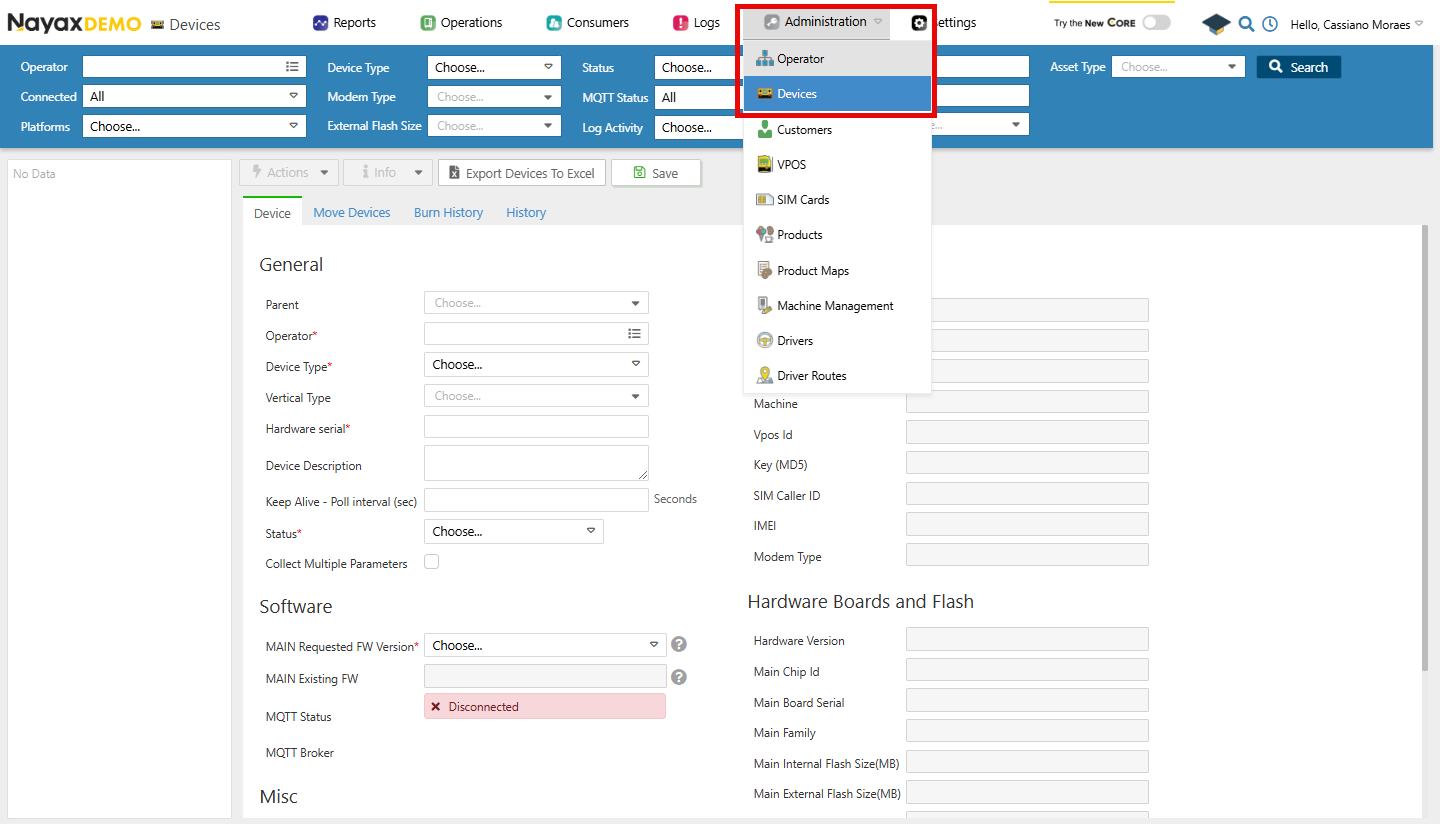 Here, you can see the General information about the selected device.
## Lynx API Methods
Lynx API allows you to retrieve all this information from one device or a group of devices programmatically using the following endpoints:
**Authentication**
Refer to the [Security & Token](/docs/manage-data-operations/lynx-api/security) page of this documentation to learn how to access your tokens, and how to properly use it to authenticate your API requests.
### Retrieve a Device by `deviceID`
Using the [Get Device by DeviceID](/reference/lynx/devices/get-device-by-deviceid) endpoint, providing it with the `deviceID` as a path parameter, you can retrieve that device's details. See an example request and response in the code block below:
```sh Request theme={null}
curl --request GET \
--url https://qa-lynx.nayax.com/operational/v1/devices/{DeviceID} \
--header 'accept: application/json'
```
```json Response theme={null}
{
"VposChipId": "string",
"IsDeviceExists": true,
"FWVersionNumber": "string",
"VposVersionNumber": "string",
"DeviceID": 0,
"ActorID": 0,
"DeviceTypeLutID": 0,
"DeviceSerial": "string",
"IMEI": "string",
"DeviceDescription": "string",
"SimCardID": 0,
"FWVersionID": 0,
"RequestedFwID": 0,
"PollInterval": 0,
"StatusID": 0,
"LastUpdated": "2024-12-09T14:40:50.980Z",
"IsCollectMultipleParameters": true,
"IsLogged": true,
"FRequestedNewVersionDate": "2024-12-09T14:40:50.980Z",
"FTookNewVersionDate": "2024-12-09T14:40:50.980Z",
"HardwareVersion": "string",
"IsRental": true,
"RentalEndMonth": 0,
"RentalEndYear": 0,
"IsToBeReturned": true,
"FeeCommunicationThreshold": 0,
"BillingPlanID": 0,
"BillingPlanActivationDate": "2024-12-09T14:40:50.980Z",
"DeviceCreationDate": "2024-12-09T14:40:50.980Z",
"CreatedBy": 0,
"UpdatedBy": 0,
"DistributorBillingPlanID": 0,
"ChipID": "string",
"OrderID": 0,
"ExternalFlashSize": 0,
"BoardSerial": "string",
"FlashSize": 0,
"DeviceFamily": "string",
"ModemModel": "string",
"TrialEndDate": "2024-12-09T14:40:50.980Z",
"VerticalTypeID": 0,
"VerticalProductTypeID": 0,
"VerticalTypeLutID": 0,
"VerticalProductTypeLutID": 0,
"Refs": {
"additionalProp": "string"
}
}
```
**Path Params**
Replace `` with the actual identifier of the device.
### Retrieve all Devices
Using the Get All Devices endpoint, you can retrieve a list of available devices. The code block below shows an example request and response.
```sh Request theme={null}
curl --request GET \
--url https://qa-lynx.nayax.com/operational/v1/devices \
--header 'accept: application/json'
```
```json Response theme={null}
[
{
"VposChipId": "string",
"IsDeviceExists": true,
"FWVersionNumber": "string",
"VposVersionNumber": "string",
"DeviceID": 0,
"ActorID": 0,
"DeviceTypeLutID": 0,
"DeviceSerial": "string",
"IMEI": "string",
"DeviceDescription": "string",
"SimCardID": 0,
"FWVersionID": 0,
"RequestedFwID": 0,
"PollInterval": 0,
"StatusID": 0,
"LastUpdated": "2024-12-09T14:40:50.980Z",
"IsCollectMultipleParameters": true,
"IsLogged": true,
"FRequestedNewVersionDate": "2024-12-09T14:40:50.980Z",
"FTookNewVersionDate": "2024-12-09T14:40:50.980Z",
"HardwareVersion": "string",
"IsRental": true,
"RentalEndMonth": 0,
"RentalEndYear": 0,
"IsToBeReturned": true,
"FeeCommunicationThreshold": 0,
"BillingPlanID": 0,
"BillingPlanActivationDate": "2024-12-09T14:40:50.980Z",
"DeviceCreationDate": "2024-12-09T14:40:50.980Z",
"CreatedBy": 0,
"UpdatedBy": 0,
"DistributorBillingPlanID": 0,
"ChipID": "string",
"OrderID": 0,
"ExternalFlashSize": 0,
"BoardSerial": "string",
"FlashSize": 0,
"DeviceFamily": "string",
"ModemModel": "string",
"TrialEndDate": "2024-12-09T14:40:50.980Z",
"VerticalTypeID": 0,
"VerticalProductTypeID": 0,
"VerticalTypeLutID": 0,
"VerticalProductTypeLutID": 0,
"Refs": {
"additionalProp": "string"
}
}
]
```
This endpoint allows you to use filters in the query parameters. See the table below for all the available query params- note that you should include at least the ActorId in the query (can add other filters as well should you be interested):
| **Query Parameter** | **Type** | **Description** |
| ------------------- | ----------- | ----------------------------------------------------------------- |
| `ActorId` | `int64` | The unique identifier of the actor associated with the devices. |
| `isConnected` | `boolean` | Filter devices based on their connection status. |
| `pageNumber` | `int32` | Defaults to 1. The page number for paginated results. |
| `pageSize` | `int32` | Defaults to 1000. The number of results per page. |
| `nayaxDeviceSerial` | `string` | The serial number of the Nayax device. |
| `orderId` | `int32` | Filter devices based on the associated order ID. |
| `statusId` | `int32` | Filter devices based on their status ID. |
| `createdDt` | `date-time` | Filter devices based on their creation date. |
| `updatedDt` | `date-time` | Filter devices based on the last updated date. |
| `boardSerial` | `string` | The serial number of the device's mainboard. |
| `imei` | `string` | The International Mobile Equipment Identity number of the device. |
| `chipId` | `string` | The unique identifier for the chip in the device. |
Here, you can see the General information about the selected device.
## Lynx API Methods
Lynx API allows you to retrieve all this information from one device or a group of devices programmatically using the following endpoints:
**Authentication**
Refer to the [Security & Token](/docs/manage-data-operations/lynx-api/security) page of this documentation to learn how to access your tokens, and how to properly use it to authenticate your API requests.
### Retrieve a Device by `deviceID`
Using the [Get Device by DeviceID](/reference/lynx/devices/get-device-by-deviceid) endpoint, providing it with the `deviceID` as a path parameter, you can retrieve that device's details. See an example request and response in the code block below:
```sh Request theme={null}
curl --request GET \
--url https://qa-lynx.nayax.com/operational/v1/devices/{DeviceID} \
--header 'accept: application/json'
```
```json Response theme={null}
{
"VposChipId": "string",
"IsDeviceExists": true,
"FWVersionNumber": "string",
"VposVersionNumber": "string",
"DeviceID": 0,
"ActorID": 0,
"DeviceTypeLutID": 0,
"DeviceSerial": "string",
"IMEI": "string",
"DeviceDescription": "string",
"SimCardID": 0,
"FWVersionID": 0,
"RequestedFwID": 0,
"PollInterval": 0,
"StatusID": 0,
"LastUpdated": "2024-12-09T14:40:50.980Z",
"IsCollectMultipleParameters": true,
"IsLogged": true,
"FRequestedNewVersionDate": "2024-12-09T14:40:50.980Z",
"FTookNewVersionDate": "2024-12-09T14:40:50.980Z",
"HardwareVersion": "string",
"IsRental": true,
"RentalEndMonth": 0,
"RentalEndYear": 0,
"IsToBeReturned": true,
"FeeCommunicationThreshold": 0,
"BillingPlanID": 0,
"BillingPlanActivationDate": "2024-12-09T14:40:50.980Z",
"DeviceCreationDate": "2024-12-09T14:40:50.980Z",
"CreatedBy": 0,
"UpdatedBy": 0,
"DistributorBillingPlanID": 0,
"ChipID": "string",
"OrderID": 0,
"ExternalFlashSize": 0,
"BoardSerial": "string",
"FlashSize": 0,
"DeviceFamily": "string",
"ModemModel": "string",
"TrialEndDate": "2024-12-09T14:40:50.980Z",
"VerticalTypeID": 0,
"VerticalProductTypeID": 0,
"VerticalTypeLutID": 0,
"VerticalProductTypeLutID": 0,
"Refs": {
"additionalProp": "string"
}
}
```
**Path Params**
Replace `` with the actual identifier of the device.
### Retrieve all Devices
Using the Get All Devices endpoint, you can retrieve a list of available devices. The code block below shows an example request and response.
```sh Request theme={null}
curl --request GET \
--url https://qa-lynx.nayax.com/operational/v1/devices \
--header 'accept: application/json'
```
```json Response theme={null}
[
{
"VposChipId": "string",
"IsDeviceExists": true,
"FWVersionNumber": "string",
"VposVersionNumber": "string",
"DeviceID": 0,
"ActorID": 0,
"DeviceTypeLutID": 0,
"DeviceSerial": "string",
"IMEI": "string",
"DeviceDescription": "string",
"SimCardID": 0,
"FWVersionID": 0,
"RequestedFwID": 0,
"PollInterval": 0,
"StatusID": 0,
"LastUpdated": "2024-12-09T14:40:50.980Z",
"IsCollectMultipleParameters": true,
"IsLogged": true,
"FRequestedNewVersionDate": "2024-12-09T14:40:50.980Z",
"FTookNewVersionDate": "2024-12-09T14:40:50.980Z",
"HardwareVersion": "string",
"IsRental": true,
"RentalEndMonth": 0,
"RentalEndYear": 0,
"IsToBeReturned": true,
"FeeCommunicationThreshold": 0,
"BillingPlanID": 0,
"BillingPlanActivationDate": "2024-12-09T14:40:50.980Z",
"DeviceCreationDate": "2024-12-09T14:40:50.980Z",
"CreatedBy": 0,
"UpdatedBy": 0,
"DistributorBillingPlanID": 0,
"ChipID": "string",
"OrderID": 0,
"ExternalFlashSize": 0,
"BoardSerial": "string",
"FlashSize": 0,
"DeviceFamily": "string",
"ModemModel": "string",
"TrialEndDate": "2024-12-09T14:40:50.980Z",
"VerticalTypeID": 0,
"VerticalProductTypeID": 0,
"VerticalTypeLutID": 0,
"VerticalProductTypeLutID": 0,
"Refs": {
"additionalProp": "string"
}
}
]
```
This endpoint allows you to use filters in the query parameters. See the table below for all the available query params- note that you should include at least the ActorId in the query (can add other filters as well should you be interested):
| **Query Parameter** | **Type** | **Description** |
| ------------------- | ----------- | ----------------------------------------------------------------- |
| `ActorId` | `int64` | The unique identifier of the actor associated with the devices. |
| `isConnected` | `boolean` | Filter devices based on their connection status. |
| `pageNumber` | `int32` | Defaults to 1. The page number for paginated results. |
| `pageSize` | `int32` | Defaults to 1000. The number of results per page. |
| `nayaxDeviceSerial` | `string` | The serial number of the Nayax device. |
| `orderId` | `int32` | Filter devices based on the associated order ID. |
| `statusId` | `int32` | Filter devices based on their status ID. |
| `createdDt` | `date-time` | Filter devices based on their creation date. |
| `updatedDt` | `date-time` | Filter devices based on the last updated date. |
| `boardSerial` | `string` | The serial number of the device's mainboard. |
| `imei` | `string` | The International Mobile Equipment Identity number of the device. |
| `chipId` | `string` | The unique identifier for the chip in the device. |