> ## Documentation Index
> Fetch the complete documentation index at: https://nayax-44d6e37b-docs-marshall-faq-redistribution.mintlify.site/llms.txt
> Use this file to discover all available pages before exploring further.
# Multi-Vending with Pre-Authorization
This guide explains the **Multi-Vending with Pre-Authorization** flow. This method allows a customer to purchase multiple products in one session after a single initial payment approval. This streamlines the transaction by consolidating authorization into one initial step.
## Payment Flow
The diagram below illustrates the complete sequence of events for a Multi-Vending with Pre-Authorization transaction.
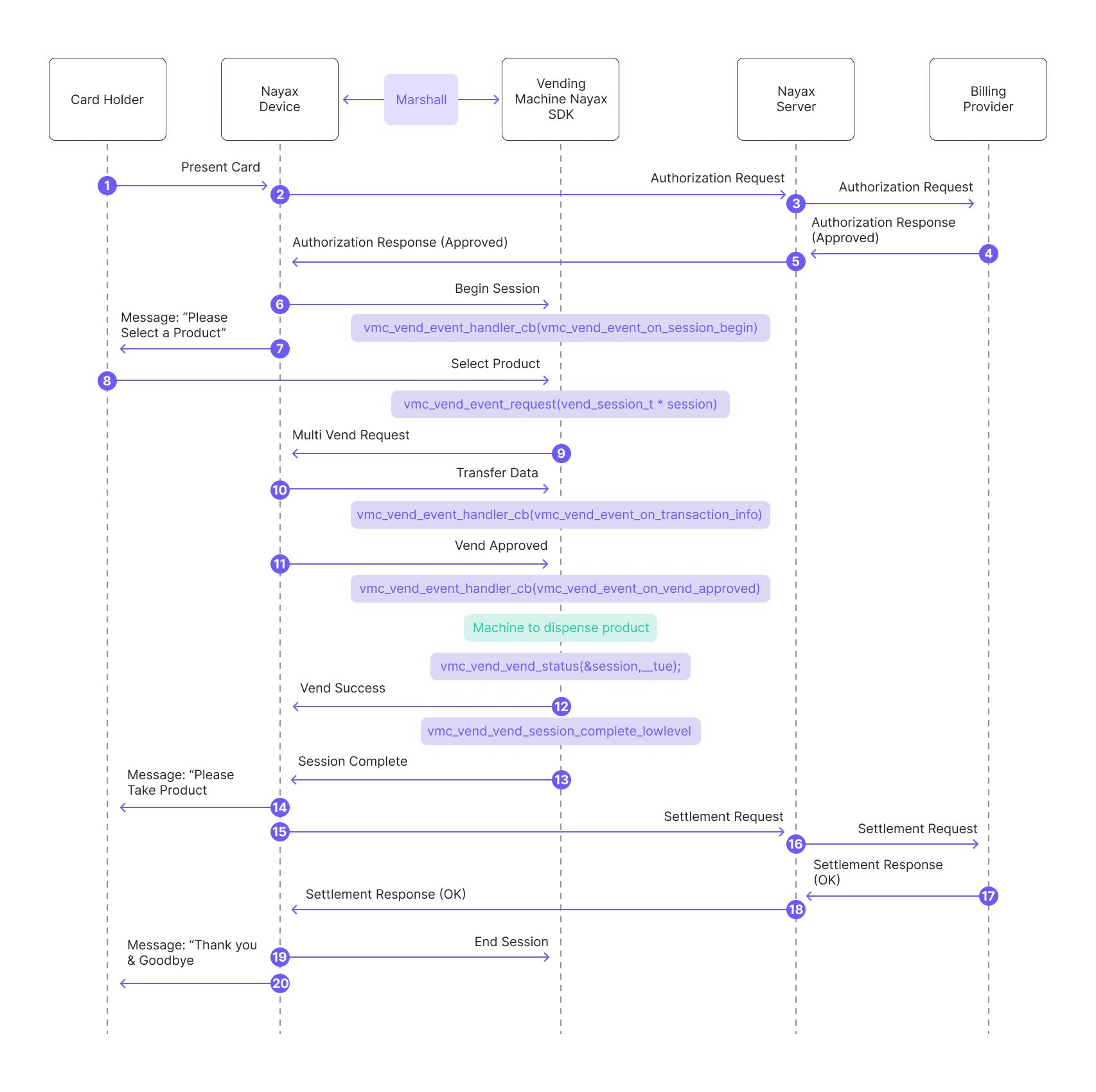 Below is a breakdown of the diagram:
1. The consumer presents the card to the Nayax Device.
2. The Nayax Device sends an authorization request to the Nayax Server.
3. The Nayax Server forwards the authorization request to the Billing Provider.
4. The Billing Provider sends an authorization response (approved) to the Nayax Server.
5. Nayax Server sends the authorization response (approved) back to the Nayax Device.
6. The peripheral's SDK begins the session and triggers the "session begin" event:
```c C theme={null}
vmc_vend_event_handler_cb(vm_vend_event_on_session_begin)
```
```csharp C# theme={null}
vend_callbacks(onBeginSession(funds_avail))
```
```java Java theme={null}
vmc_vend_events()
(via onBeginSession(funds_avail))
```
7. Message to the consumer: "Please Select a Product."
8. The consumer selects the desired product/s from the vending machine. Said products are being added to a list called "session":
```c C theme={null}
session_products[0].code = 1;
session_products[0] .qty = 1;
session_products[0].price = 10;
session_products[0].unit = 1;
session_products[1].code = 2;
session_products[1].qty = 1;
session_products[1].price = 20;
session_products[1].unit = 1;
if (config.multi_vend_support)
{
session->products = session_products;
session->total_products = 2;
}
```
```csharp C# theme={null}
List list = new List();
list.Add(new vmc_vend_t.vend_item_t((ushort)1, (ushort)10, (ushort)1, (byte)1));
list.Add(new vmc_vend_t.vend_item_t((ushort)2, (ushort)20, (ushort)2, (byte)1));
list.Add(new vmc_vend_t.vend_item_t((ushort)3, (ushort)30, (ushort)3, (byte)1));
// prepare single session object
session = new vmc_vend_t.vend_session_t(list);
```
```java Java theme={null}
ArrayList list = new ArrayList();
list.add(new vmc_vend_t.vend_item_t((short) 0, (short) 100, (short) 1, (byte) 1));
list.add(new vmc_vend_t.vend_item_t((short) 1, (short) 100, (short) 1, (byte) 1));
list.add(new vmc_vend_t.vend_item_t((short) 2, (short) 200, (short) 2, (byte) 1));
list.add(new vmc_vend_t.vend_item_t((short) 3, (short) 100, (short) 1, (byte) 1));
list.add(new vmc_vend_t.vend_item_t((short) 4, (short) 200, (short) 2, (byte) 1));
// in this sample we can have up to 2 sessions (in case of multi-session)
m_sessions = new vmc_vend_t.vend_session_t[1];
// prepare single session object
m_sessions[0] = new vmc_vend_t.vend_session_t(3, list);
```
9. The peripheral's SDK sends a "Multi Vend Request" to the Nayax Device:
```c C theme={null}
vmc_vend_vend_request(vend_session_t *session)
```
```csharp C# theme={null}
vmc_instance.vend.vend_request(session);
```
```java Java theme={null}
m_vmc.vend.vend_request(m_sessions[m_active_session]);
```
10. The peripheral's SDK handles transaction data received from the Nayax Device via Transfer Data (said data includes information about the Nayax transaction ID and the consumer's card details):
```c C theme={null}
vmc_vend_event_handler_cb(vm_vend_event_on_transaction_info)
```
```csharp C# theme={null}
vend_callbacks(onTransactionInfo(data))
```
```java Java theme={null}
vmc_vend_events()
(via onTransactionInfo(data))
```
11. The peripheral's SDK triggers the "vend approved" event:
```c C theme={null}
vmc_vend_event_handler_cb(vm_vend_event_on_vend_approved)
```
```csharp C# theme={null}
vend_callbacks()
(via onVendApproved(session))
```
```java Java theme={null}
vmc_vend_events()
(via onVendApproved(session))
```
12. The peripheral dispenses the product/ provides the service to the consumer
13. The SDK reports "vend success":
```c C theme={null}
vmc_vend_vend_status(&session, __true)
```
```csharp C# theme={null}
vmc_vend_events()
(via onVendApproved(session) -which would return "true")
```
```java Java theme={null}
vmc_vend_events()
(via onVendApproved(session) -which would return "true")
```
Below is a breakdown of the diagram:
1. The consumer presents the card to the Nayax Device.
2. The Nayax Device sends an authorization request to the Nayax Server.
3. The Nayax Server forwards the authorization request to the Billing Provider.
4. The Billing Provider sends an authorization response (approved) to the Nayax Server.
5. Nayax Server sends the authorization response (approved) back to the Nayax Device.
6. The peripheral's SDK begins the session and triggers the "session begin" event:
```c C theme={null}
vmc_vend_event_handler_cb(vm_vend_event_on_session_begin)
```
```csharp C# theme={null}
vend_callbacks(onBeginSession(funds_avail))
```
```java Java theme={null}
vmc_vend_events()
(via onBeginSession(funds_avail))
```
7. Message to the consumer: "Please Select a Product."
8. The consumer selects the desired product/s from the vending machine. Said products are being added to a list called "session":
```c C theme={null}
session_products[0].code = 1;
session_products[0] .qty = 1;
session_products[0].price = 10;
session_products[0].unit = 1;
session_products[1].code = 2;
session_products[1].qty = 1;
session_products[1].price = 20;
session_products[1].unit = 1;
if (config.multi_vend_support)
{
session->products = session_products;
session->total_products = 2;
}
```
```csharp C# theme={null}
List list = new List();
list.Add(new vmc_vend_t.vend_item_t((ushort)1, (ushort)10, (ushort)1, (byte)1));
list.Add(new vmc_vend_t.vend_item_t((ushort)2, (ushort)20, (ushort)2, (byte)1));
list.Add(new vmc_vend_t.vend_item_t((ushort)3, (ushort)30, (ushort)3, (byte)1));
// prepare single session object
session = new vmc_vend_t.vend_session_t(list);
```
```java Java theme={null}
ArrayList list = new ArrayList();
list.add(new vmc_vend_t.vend_item_t((short) 0, (short) 100, (short) 1, (byte) 1));
list.add(new vmc_vend_t.vend_item_t((short) 1, (short) 100, (short) 1, (byte) 1));
list.add(new vmc_vend_t.vend_item_t((short) 2, (short) 200, (short) 2, (byte) 1));
list.add(new vmc_vend_t.vend_item_t((short) 3, (short) 100, (short) 1, (byte) 1));
list.add(new vmc_vend_t.vend_item_t((short) 4, (short) 200, (short) 2, (byte) 1));
// in this sample we can have up to 2 sessions (in case of multi-session)
m_sessions = new vmc_vend_t.vend_session_t[1];
// prepare single session object
m_sessions[0] = new vmc_vend_t.vend_session_t(3, list);
```
9. The peripheral's SDK sends a "Multi Vend Request" to the Nayax Device:
```c C theme={null}
vmc_vend_vend_request(vend_session_t *session)
```
```csharp C# theme={null}
vmc_instance.vend.vend_request(session);
```
```java Java theme={null}
m_vmc.vend.vend_request(m_sessions[m_active_session]);
```
10. The peripheral's SDK handles transaction data received from the Nayax Device via Transfer Data (said data includes information about the Nayax transaction ID and the consumer's card details):
```c C theme={null}
vmc_vend_event_handler_cb(vm_vend_event_on_transaction_info)
```
```csharp C# theme={null}
vend_callbacks(onTransactionInfo(data))
```
```java Java theme={null}
vmc_vend_events()
(via onTransactionInfo(data))
```
11. The peripheral's SDK triggers the "vend approved" event:
```c C theme={null}
vmc_vend_event_handler_cb(vm_vend_event_on_vend_approved)
```
```csharp C# theme={null}
vend_callbacks()
(via onVendApproved(session))
```
```java Java theme={null}
vmc_vend_events()
(via onVendApproved(session))
```
12. The peripheral dispenses the product/ provides the service to the consumer
13. The SDK reports "vend success":
```c C theme={null}
vmc_vend_vend_status(&session, __true)
```
```csharp C# theme={null}
vmc_vend_events()
(via onVendApproved(session) -which would return "true")
```
```java Java theme={null}
vmc_vend_events()
(via onVendApproved(session) -which would return "true")
```
**Note:** in case of partial dispensing (meaning not all of the selected items were actually vended) you can create a new list with only the items which were actually vended prior to responding with "true":
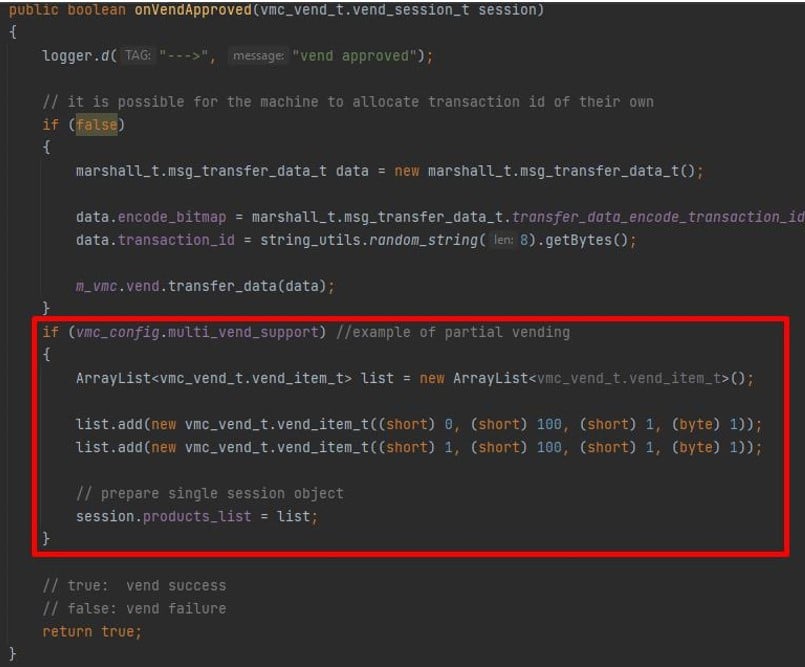 And completes the vending session:
```c C theme={null}
vmc_vend_vend_session_complete_lowlevel()
```
```csharp C# theme={null}
no such function in C# or Java due to the nature of the languages
```
```java Java theme={null}
no such function in C# or Java due to the nature of the languages
```
14. Message to the consumer: "Please Take Product."
15. Nayax Device sends a settlement request to the Nayax Server.
16. Nayax Server forwards the settlement request to the Billing Provider.
17. The Billing Provider sends a settlement response (OK) to the Nayax Server.
18. Nayax Server sends the settlement response (OK) back to the Nayax Device.
## Partial Vending
Partial vending applies only to Multi-Vend. It covers the case where the consumer selected several products but only some of them could be vended.
Take a consumer who selected five items:
And completes the vending session:
```c C theme={null}
vmc_vend_vend_session_complete_lowlevel()
```
```csharp C# theme={null}
no such function in C# or Java due to the nature of the languages
```
```java Java theme={null}
no such function in C# or Java due to the nature of the languages
```
14. Message to the consumer: "Please Take Product."
15. Nayax Device sends a settlement request to the Nayax Server.
16. Nayax Server forwards the settlement request to the Billing Provider.
17. The Billing Provider sends a settlement response (OK) to the Nayax Server.
18. Nayax Server sends the settlement response (OK) back to the Nayax Device.
## Partial Vending
Partial vending applies only to Multi-Vend. It covers the case where the consumer selected several products but only some of them could be vended.
Take a consumer who selected five items:
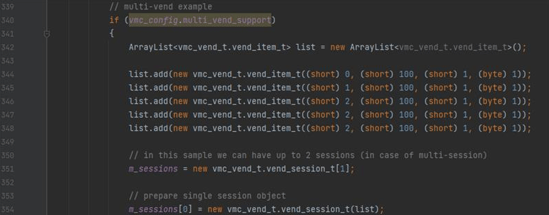 To simulate only two of them being vended, add the following inside the `onVendApproved` callback of your demo app:
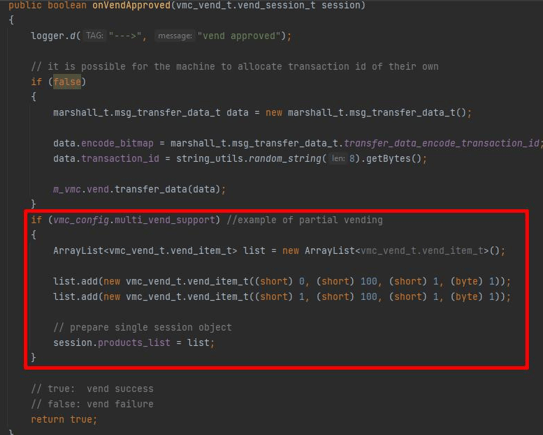 ```java Java theme={null}
if (vmc_config.multi_vend_support) //example of partial vending
{
ArrayList list = new ArrayList();
list.add(new vmc_vend_t.vend_item_t((short) 0, (short) 100, (short) 1, (byte) 1));
list.add(new vmc_vend_t.vend_item_t((short) 1, (short) 100, (short) 1, (byte) 1));
// prepare single session object
session.products_list = list;
}
```
```csharp C# theme={null}
if (vmc_config.multi_vend_support) //example of partial vending
{
List list = new List();
list.Add(new vmc_vend_t.vend_item_t((ushort)0, (ushort)10, (ushort)1, (byte)1));
list.Add(new vmc_vend_t.vend_item_t((ushort)1, (ushort)10, (ushort)1, (byte)1));
// prepare single session object
session = new vmc_vend_t.vend_session_t(list);
}
```
```c C theme={null}
session->products = &session_products[0];
session->total_products = 1;
```
## See Also
Explore the full range of payment flows available in the Marshall SDK.
Get up and running with the Marshall SDK integration.
Find reference documentation for all methods and functions in the Marshall SDK.
```java Java theme={null}
if (vmc_config.multi_vend_support) //example of partial vending
{
ArrayList list = new ArrayList();
list.add(new vmc_vend_t.vend_item_t((short) 0, (short) 100, (short) 1, (byte) 1));
list.add(new vmc_vend_t.vend_item_t((short) 1, (short) 100, (short) 1, (byte) 1));
// prepare single session object
session.products_list = list;
}
```
```csharp C# theme={null}
if (vmc_config.multi_vend_support) //example of partial vending
{
List list = new List();
list.Add(new vmc_vend_t.vend_item_t((ushort)0, (ushort)10, (ushort)1, (byte)1));
list.Add(new vmc_vend_t.vend_item_t((ushort)1, (ushort)10, (ushort)1, (byte)1));
// prepare single session object
session = new vmc_vend_t.vend_session_t(list);
}
```
```c C theme={null}
session->products = &session_products[0];
session->total_products = 1;
```
## See Also
Explore the full range of payment flows available in the Marshall SDK.
Get up and running with the Marshall SDK integration.
Find reference documentation for all methods and functions in the Marshall SDK.