> ## Documentation Index
> Fetch the complete documentation index at: https://nayax-44d6e37b-docs-marshall-faq-redistribution.mintlify.site/llms.txt
> Use this file to discover all available pages before exploring further.

# VMC Configuration Object

The `vmc_configuration` class is used to set up various parameters and flags that control the behavior of the peripheral. Proper configuration is crucial for ensuring smooth operation and compatibility with different peripherals.

## Configuration Object

The code block below displays the `vmc_configuration` class for the available SDK languages.

<CodeGroup>
  ```java Java theme={null}
  public class vmc_configuration 
        public Object port_vpos;
        public int port_vpos_baud;

        public String serial;
        public String model;
        public String sw_ver;
        public int    machine_type;
        boolean explicit_vend_success;
        public boolean price_not_final_support;
        public boolean mag_card_approved_by_vmc_support;
        public boolean mifare_approved_by_vmc_support;

        public boolean debug;
        public int dump_packets_level;

        public boolean reader_always_on;
        public boolean multi_session_support;
        public boolean multi_vend_support;
        public boolean always_idle;
        public 
  ```

  ```csharp C# theme={null}
  public class vmc_configuration 
        public string  port_vpos;
        public int port_vpos_baud;

        public string serial;
        public string model;
        public string sw_ver;
        public int    machine_type;

        public bool reader_always_on;
        public bool multi_session_support;
        public bool multi_vend_support;
        public bool always_idle;
        public bool explicit_vend_success;
        public bool price_not_final_support;
        public bool mag_card_approved_by_vmc_support;
        public bool mifare_approved_by_vmc_support;

        public bool debug;
        public int dump_packets_level;
  ```
</CodeGroup>

### Object Parameters

The table below describes the parameters of the class.

<table align={["left","left","left"]}>
  <thead>
    <tr>
      <th>
        Parameter
      </th>

      <th>
        Type
      </th>

      <th>
        Description
      </th>
    </tr>
  </thead>

  <tbody>
    <tr>
      <td>
        `port_vpos`
      </td>

      <td>
        String
      </td>

      <td>
        The PC COM port to which the Nayax device is connected.
      </td>
    </tr>

    <tr>
      <td>
        `port_vpos_baud`
      </td>

      <td>
        int
      </td>

      <td>
        The baud rate for the Nayax device communication port.
      </td>
    </tr>

    <tr>
      <td>
        `serial`
      </td>

      <td>
        String
      </td>

      <td>
        The serial number of the machine. This enables precise tracking, effective inventory management, and streamlined maintenance scheduling.
      </td>
    </tr>

    <tr>
      <td>
        `model`
      </td>

      <td>
        String
      </td>

      <td>
        Model name of the machine. It assists in troubleshooting by distinguishing different machine types in logs and reports.
      </td>
    </tr>

    <tr>
      <td>
        `sw_ver`
      </td>

      <td>
        String
      </td>

      <td>
        The software version of the peripheral.
      </td>
    </tr>

    <tr>
      <td>
        `machine_type`
      </td>

      <td>
        int
      </td>

      <td>
        The type of peripheral.
      </td>
    </tr>

    <tr>
      <td>
        `explicit_vend_success`
      </td>

      <td>
        bool
      </td>

      <td>
        Flag to indicate explicit vending status (success/failure). Relevant only for long vending process.
      </td>
    </tr>

    <tr>
      <td>
        `price_not_final_support`
      </td>

      <td>
        bool
      </td>

      <td>
        Indicates if the price is not final, meaning the settlement price can be different than the one authorized.
        Relevant for Multisession flow only.
      </td>
    </tr>

    <tr>
      <td>
        `mag_card_approved_by_vmc_support`
      </td>

      <td>
        bool
      </td>

      <td>
        Support for magnetic card approval by the peripheral.
      </td>
    </tr>

    <tr>
      <td>
        `mifare_approved_by_vmc_support`
      </td>

      <td>
        bool
      </td>

      <td>
        Support for MIFARE card approval by the peripheral.
      </td>
    </tr>

    <tr>
      <td>
        `debug`
      </td>

      <td>
        bool
      </td>

      <td>
        Enables or disables debugging. Enabling it is mandatory in order to generate the SDK's logs.
      </td>
    </tr>

    <tr>
      <td>
        `dump_packets_level`
      </td>

      <td>
        int
      </td>

      <td>
        Sets the level of packet logging for debugging purposes.
      </td>
    </tr>

    <tr>
      <td>
        `reader_always_on`
      </td>

      <td>
        bool
      </td>

      <td>
        It keeps the Nayax device's reader always enabled and ready for transactions. Used in cases in which the peripheral would like a card's presentation to be a trigger for product selection.
      </td>
    </tr>

    <tr>
      <td>
        `multi_session_support`
      </td>

      <td>
        bool
      </td>

      <td>
        Enables support for Multi-Session flow
      </td>
    </tr>

    <tr>
      <td>
        `multi_vend_support`
      </td>

      <td>
        bool
      </td>

      <td>
        Enables support for Multi-vend flow.
      </td>
    </tr>

    <tr>
      <td>
        `always_idle`
      </td>

      <td>
        bool
      </td>

      <td>
        Configures the device to start transactions by product selection and have the authorized amount appear on Nayax's device screen (instead of animations).
      </td>
    </tr>
  </tbody>
</table>

## Mandatory Fields

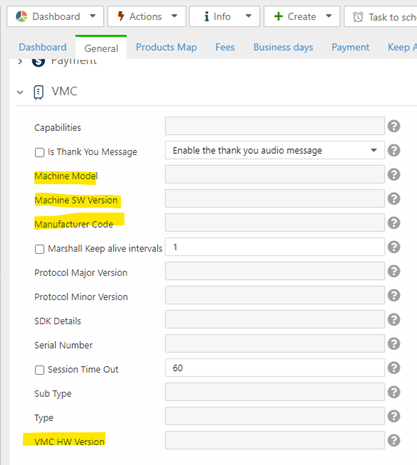
When configuring a VMC (Vending Machine Controller), there are specific mandatory fields essential for the proper identification of the machine. Properly managing these fields leads to improved troubleshooting, enhanced system integration, and more efficient maintenance processes.

Refer to the code block below for an example of the configuration for these mandatory fields.

<CodeGroup>
  ```java Java theme={null}
  vmc_config = new vmc_configuration();

  vmc_config.model = "marshall-java-sdk";
  vmc_config.serial = "01234567";
  vmc_config.hw_ver = "01234567";
  vmc_config.manuf_code = "manuf";
  ```

  ```csharp C# theme={null}
  vmc_config = new vmc_configuration();

  vmc_config.model = "marshall-java-sdk";
  vmc_config.serial = "01234567";
  vmc_config.hw_ver = "01234567";
  vmc_config.manuf_code = "manuf";
  ```

  ```c C theme={null}
  vmc_init()
  	__strcpy(config.model, "marshall-c-sdk-demo");
  	__strcpy(config.serial, "01234567");
  	__strcpy(config.sw_ver, "vmc app version");
  	__strcpy(config.vmc_hw_ver, “01234567”);
    __strcpy(config. vmc_manuf_code, “manuf”);
  ```
</CodeGroup>

The table below describes the parameters:

| Parameter    | Type   | Description                                                                                                                                                                         |
| :----------- | :----- | :---------------------------------------------------------------------------------------------------------------------------------------------------------------------------------- |
| `model`      | String | Model name of the machine. It assists in troubleshooting by distinguishing different machine types in logs and reports.                                                             |
| `serial`     | String | The serial number of the machine. This enables precise tracking, effective inventory management, and streamlined maintenance scheduling.                                            |
| `hw_ver`     | String | Hardware version of the machine. It ensures that the correct firmware and software are used. Different hardware versions may require specific drivers or compatibility adjustments. |
| `manuf_code` | String | Identifies the machine's manufacturer, enabling proper support and operation.                                                                                                       |

### Nayax Core

These parameters will be saved in Nayax Core. You can find them in **Operations > Machines**. Find and select your machine and open the **VMC** tab, as shown in the following image.

<Frame>
  <img src="https://mintcdn.com/nayax-44d6e37b-docs-marshall-faq-redistribution/PpgA-AdAmE5-018b/images/docs/vmc-configuration-object/image1.png?fit=max&auto=format&n=PpgA-AdAmE5-018b&q=85&s=1849a2af356cbd8d61b687f628b4047a" width="417" height="465" data-path="images/docs/vmc-configuration-object/image1.png" />
</Frame>

## See Also

<CardGroup cols={2}>
  <Card icon="laptop-code" title="C# & Java SDK Integration" href="/docs/integrate-pos-device/marshall/get-started/marshall-csharp-java-integration">
    Integrate the Marshall SDK into your C# or Java application.
  </Card>

  <Card icon="microchip" title="C SDK Integration" href="/docs/integrate-pos-device/marshall/get-started/c-sdk-integration">
    Integrate the Marshall C SDK into your platform.
  </Card>
</CardGroup>