> ## Documentation Index
> Fetch the complete documentation index at: https://nayax-44d6e37b-docs-marshall-faq-redistribution.mintlify.site/llms.txt
> Use this file to discover all available pages before exploring further.
# Display Control (Screen Display)
Display Control is a Preselection feature that allows a transaction process to begin by selecting a product on the Nayax device, with the consumer selecting the desired product by touching the relevant screen on the device.
The configuration of said screens can be done in 2 ways:
The first, more common one, is done via the "Display Control" command to the device, which can be sent from the peripheral at any point of the device being in idle- meaning once "onReady()" has been triggered:
```c C theme={null}
"vmc_vend_event_on_ready" event
in vmc_vend_event_handler_cb
```
```csharp C# theme={null}
onReady(config);
```
```java Java theme={null}
onReady(config);
```
This event means that:
• The VPOST/VPOSM device is fully initialized
• Communication is established and stable
• The system is ready to accept Display Control commands
**Implementation Example:**
For the C SDK, you can see this pattern in the provided example code in mymain\_always\_idle.c:
```c C theme={null}
static __bool vmc_vend_event_handler_cb(int event_id, void *data)
{
switch (event_id)
{
case vmc_vend_event_on_ready:
// This is the correct place to send display control
handler_display_control(&display);
break;
// ... other cases
}
return result;
}
```
```csharp C# theme={null}
public override void onReady(vmc_vend_t.vend_session_t session)
{
// vmc is ready for new session
logger.d(TAG, "ready for new session");
// This is the correct place to send display control
}
```
**Important Notes - C SDK**
**Required Configuration Change**
Please also make this important configuration update in your project:
File: makefile.include
Change: Set MARSHALL\_MSG\_ARRAY\_SIZE to 4
MARSHALL\_MSG\_ARRAY\_SIZE = 4
This ensures sufficient message buffer allocation for display control operations.
• Do not modify any files in vpos (such as vmc\_vend.c, vmc\_link.c)
• Using vmc\_vend\_event\_on\_ready ensures proper timing without arbitrary delays
The second is via sending a command via Nayax Core (Nayax's backoffice)- more on that below.
**Note:**
* The device’s limitation is up to 12 objects per Layout.
* Use %c in the beginning of the label value to show a clock icon.
Once either configuration has been sent, it will remain on the device (no need to resend it after every transaction; only after the pairing process).
## Display Control Related Commands
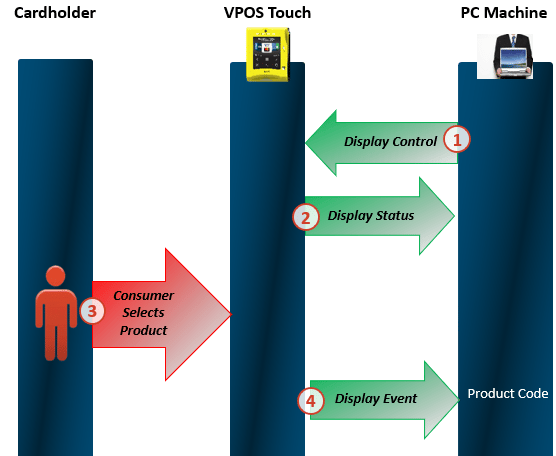 ### Updating the Screens
As can be seen in the PowerPoint above, once the Display Control command has been sent, the device would respond with a Display Status command, letting it know whether or not the device received said command and its validity.
### Starting a Transaction
Once a consumer has selected a product (screen) on the device, the device would respond with information the peripheral regarding which screen was selected, to which it should respond with a "Vend Request" with the relevant product code and price in order for the transaction process to begin.
## Possible Layouts- VPOST only (except for layouts 7,8 which are also relevant for Media)
### Updating the Screens
As can be seen in the PowerPoint above, once the Display Control command has been sent, the device would respond with a Display Status command, letting it know whether or not the device received said command and its validity.
### Starting a Transaction
Once a consumer has selected a product (screen) on the device, the device would respond with information the peripheral regarding which screen was selected, to which it should respond with a "Vend Request" with the relevant product code and price in order for the transaction process to begin.
## Possible Layouts- VPOST only (except for layouts 7,8 which are also relevant for Media)
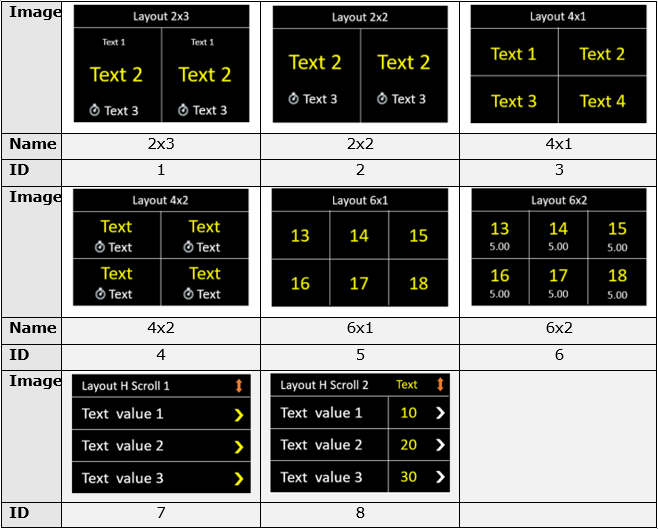 ### Layouts Relevant for VPOSM Only:
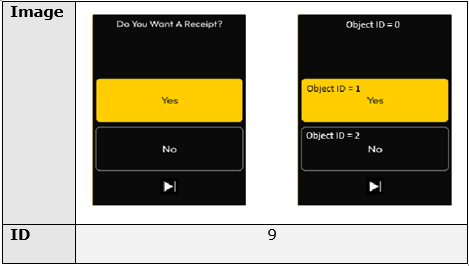
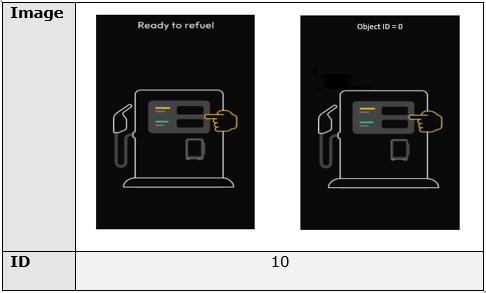
 ## Layout Examples
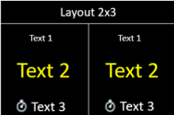
### Layout ID 1
## Layout Examples
### Layout ID 1
 ```java Java theme={null}
// allocate layout
marshall_t.msg_display_control_t.layout_t ui_context = m_vmc.general.display_control_create_layout(1);
// add label
m_vmc.general.display_control_layout_add_label(ui_context, 0, 0, "Layout 2x3");
m_vmc.general.display_control_layout_add_label(ui_context, 1, 0, "Text 1");
m_vmc.general.display_control_layout_add_label(ui_context, 1, 1, "Text 2");
m_vmc.general.display_control_layout_add_label(ui_context, 1, 2, "%cText 3");
m_vmc.general.display_control_layout_add_label(ui_context, 2, 0, "Text 1");
m_vmc.general.display_control_layout_add_label(ui_context, 2, 1, "Text 2");
m_vmc.general.display_control_layout_add_label(ui_context, 2, 2, "%cText 3");
// apply layout on screen
m_vmc.general.display_control_apply_layout(ui_context);
```
```csharp C# theme={null}
// allocate layout
Object ui_context = vmc_instance.general.display_control_create_layout(1);
// add label
vmc_instance.general.display_control_layout_add_label(ui_context, 0, 0, "Layout 2x3");
vmc_instance.general.display_control_layout_add_label(ui_context, 1, 0, "Text 1");
vmc_instance.general.display_control_layout_add_label(ui_context, 1, 1, "Text 2");
vmc_instance.general.display_control_layout_add_label(ui_context, 1, 2, "%cText 3");
vmc_instance.general.display_control_layout_add_label(ui_context, 2, 0, "Text 1");
vmc_instance.general.display_control_layout_add_label(ui_context, 2, 1, "Text 2");
vmc_instance.general.display_control_layout_add_label(ui_context, 2, 2, "%cText 3");
// apply layout on screen
vmc_instance.general.display_control_apply_layout(ui_context);
```
```c C theme={null}
static void handler_display_control(void *aux_data)
{
display_t display;
layout_t layout;
label_t labels[30];
int index = 0;
__strcpy(labels[index].label, "Layout 2x3");
labels[index].object_id = index;
labels[index].label_num_in_layout = index;
index++;
for (; index < 2; index++)
{
label_t *lbl = &labels[index];
sprintf(lbl->label, "Text1");
lbl->object_id = index;
lbl->label_num_in_layout = 0;
label_t *lbl = &labels[index];
sprintf(lbl->label, "Text2");
lbl->object_id = index;
lbl->label_num_in_layout = 1;
label_t *lbl = &labels[index];
sprintf(lbl->label, "%cText3");
lbl->object_id = index;
lbl->label_num_in_layout = 2;
}
layout.layout_id = 1; // 2x3
layout.labels_num = 7;
layout.buttons_num = 0;
vmc_general_apply_display_control(&display);
}
```
### Layout ID 2
```java Java theme={null}
// allocate layout
marshall_t.msg_display_control_t.layout_t ui_context = m_vmc.general.display_control_create_layout(1);
// add label
m_vmc.general.display_control_layout_add_label(ui_context, 0, 0, "Layout 2x3");
m_vmc.general.display_control_layout_add_label(ui_context, 1, 0, "Text 1");
m_vmc.general.display_control_layout_add_label(ui_context, 1, 1, "Text 2");
m_vmc.general.display_control_layout_add_label(ui_context, 1, 2, "%cText 3");
m_vmc.general.display_control_layout_add_label(ui_context, 2, 0, "Text 1");
m_vmc.general.display_control_layout_add_label(ui_context, 2, 1, "Text 2");
m_vmc.general.display_control_layout_add_label(ui_context, 2, 2, "%cText 3");
// apply layout on screen
m_vmc.general.display_control_apply_layout(ui_context);
```
```csharp C# theme={null}
// allocate layout
Object ui_context = vmc_instance.general.display_control_create_layout(1);
// add label
vmc_instance.general.display_control_layout_add_label(ui_context, 0, 0, "Layout 2x3");
vmc_instance.general.display_control_layout_add_label(ui_context, 1, 0, "Text 1");
vmc_instance.general.display_control_layout_add_label(ui_context, 1, 1, "Text 2");
vmc_instance.general.display_control_layout_add_label(ui_context, 1, 2, "%cText 3");
vmc_instance.general.display_control_layout_add_label(ui_context, 2, 0, "Text 1");
vmc_instance.general.display_control_layout_add_label(ui_context, 2, 1, "Text 2");
vmc_instance.general.display_control_layout_add_label(ui_context, 2, 2, "%cText 3");
// apply layout on screen
vmc_instance.general.display_control_apply_layout(ui_context);
```
```c C theme={null}
static void handler_display_control(void *aux_data)
{
display_t display;
layout_t layout;
label_t labels[30];
int index = 0;
__strcpy(labels[index].label, "Layout 2x3");
labels[index].object_id = index;
labels[index].label_num_in_layout = index;
index++;
for (; index < 2; index++)
{
label_t *lbl = &labels[index];
sprintf(lbl->label, "Text1");
lbl->object_id = index;
lbl->label_num_in_layout = 0;
label_t *lbl = &labels[index];
sprintf(lbl->label, "Text2");
lbl->object_id = index;
lbl->label_num_in_layout = 1;
label_t *lbl = &labels[index];
sprintf(lbl->label, "%cText3");
lbl->object_id = index;
lbl->label_num_in_layout = 2;
}
layout.layout_id = 1; // 2x3
layout.labels_num = 7;
layout.buttons_num = 0;
vmc_general_apply_display_control(&display);
}
```
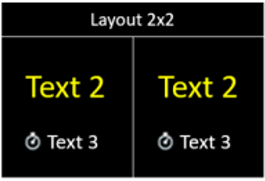
### Layout ID 2
 ```java Java theme={null}
// allocate layout
marshall_t.msg_display_control_t.layout_t ui_context = m_vmc.general.display_control_create_layout(2);
// add label
m_vmc.general.display_control_layout_add_label(ui_context, 0, 0, "Layout 2x2");
m_vmc.general.display_control_layout_add_label(ui_context, 1, 0, "Text 2");
m_vmc.general.display_control_layout_add_label(ui_context, 1, 1, "%cText 3");
m_vmc.general.display_control_layout_add_label(ui_context, 2, 0, "Text 2");
m_vmc.general.display_control_layout_add_label(ui_context, 2, 1, "%cText 3");
// apply layout on screen
m_vmc.general.display_control_apply_layout(ui_context);
```
```csharp C# theme={null}
// allocate layout
Object ui_context = vmc_instance.general.display_control_create_layout(2);
// add label
vmc_instance.general.display_control_layout_add_label(ui_context, 0, 0, "Layout 2x2");
vmc_instance.general.display_control_layout_add_label(ui_context, 1, 0, "Text 2");
vmc_instance.general.display_control_layout_add_label(ui_context, 1, 1, "%cText 3");
vmc_instance.general.display_control_layout_add_label(ui_context, 2, 0, "Text 2");
vmc_instance.general.display_control_layout_add_label(ui_context, 2, 1, "%cText 3");
// apply layout on screen
vmc_instance.general.display_control_apply_layout(ui_context);
```
```c C theme={null}
static void handler_display_control(void *aux_data)
{
display_t display;
layout_t layout;
label_t labels[30];
int index = 0;
__strcpy(labels[index].label, "Layout 2x2");
labels[index].object_id = index;
labels[index].label_num_in_layout = index;
index++;
for (; index < 2; index++)
{
label_t *lbl = &labels[index];
sprintf(lbl->label, "Text2");
lbl->object_id = index;
lbl->label_num_in_layout = 0;
label_t *lbl = &labels[index];
sprintf(lbl->label, "%cText3");
lbl->object_id = index;
lbl->label_num_in_layout = 1;
}
layout.layout_id = 2; // 2x2
layout.labels_num = 5;
layout.buttons_num = 0;
vmc_general_apply_display_control(&display);
}
```
### Layout ID 3
```java Java theme={null}
// allocate layout
marshall_t.msg_display_control_t.layout_t ui_context = m_vmc.general.display_control_create_layout(2);
// add label
m_vmc.general.display_control_layout_add_label(ui_context, 0, 0, "Layout 2x2");
m_vmc.general.display_control_layout_add_label(ui_context, 1, 0, "Text 2");
m_vmc.general.display_control_layout_add_label(ui_context, 1, 1, "%cText 3");
m_vmc.general.display_control_layout_add_label(ui_context, 2, 0, "Text 2");
m_vmc.general.display_control_layout_add_label(ui_context, 2, 1, "%cText 3");
// apply layout on screen
m_vmc.general.display_control_apply_layout(ui_context);
```
```csharp C# theme={null}
// allocate layout
Object ui_context = vmc_instance.general.display_control_create_layout(2);
// add label
vmc_instance.general.display_control_layout_add_label(ui_context, 0, 0, "Layout 2x2");
vmc_instance.general.display_control_layout_add_label(ui_context, 1, 0, "Text 2");
vmc_instance.general.display_control_layout_add_label(ui_context, 1, 1, "%cText 3");
vmc_instance.general.display_control_layout_add_label(ui_context, 2, 0, "Text 2");
vmc_instance.general.display_control_layout_add_label(ui_context, 2, 1, "%cText 3");
// apply layout on screen
vmc_instance.general.display_control_apply_layout(ui_context);
```
```c C theme={null}
static void handler_display_control(void *aux_data)
{
display_t display;
layout_t layout;
label_t labels[30];
int index = 0;
__strcpy(labels[index].label, "Layout 2x2");
labels[index].object_id = index;
labels[index].label_num_in_layout = index;
index++;
for (; index < 2; index++)
{
label_t *lbl = &labels[index];
sprintf(lbl->label, "Text2");
lbl->object_id = index;
lbl->label_num_in_layout = 0;
label_t *lbl = &labels[index];
sprintf(lbl->label, "%cText3");
lbl->object_id = index;
lbl->label_num_in_layout = 1;
}
layout.layout_id = 2; // 2x2
layout.labels_num = 5;
layout.buttons_num = 0;
vmc_general_apply_display_control(&display);
}
```
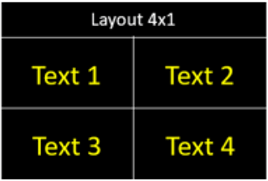
### Layout ID 3
 ```java Java theme={null}
// allocate layout
marshall_t.msg_display_control_t.layout_t ui_context = m_vmc.general.display_control_create_layout(3);
// add label
m_vmc.general.display_control_layout_add_label(ui_context, 0, 0, "Layout 4x1");
m_vmc.general.display_control_layout_add_label(ui_context, 1, 0, "Text 1");
m_vmc.general.display_control_layout_add_label(ui_context, 2, 0, "Text 2");
m_vmc.general.display_control_layout_add_label(ui_context, 3, 0, "Text 3");
m_vmc.general.display_control_layout_add_label(ui_context, 4, 0, "Text 4");
// apply layout on screen
m_vmc.general.display_control_apply_layout(ui_context);
```
```csharp C# theme={null}
// allocate layout
Object ui_context = vmc_instance.general.display_control_create_layout(3);
// add label
vmc_instance.general.display_control_layout_add_label(ui_context, 0, 0, "Layout 4x1");
vmc_instance.general.display_control_layout_add_label(ui_context, 1, 0, "Text 1");
vmc_instance.general.display_control_layout_add_label(ui_context, 2, 0, "Text 2");
vmc_instance.general.display_control_layout_add_label(ui_context, 3, 0, "Text 3");
vmc_instance.general.display_control_layout_add_label(ui_context, 4, 0, "Text 4");
// apply layout on screen
vmc_instance.general.display_control_apply_layout(ui_context);
```
```c C theme={null}
static void handler_display_control(void *aux_data)
{
display_t display;
layout_t layout;
label_t labels[30];
int index = 0;
__strcpy(labels[index].label, "Layout 4x1");
labels[index].object_id = index;
labels[index].label_num_in_layout = index;
index++;
for (; index < 4; index++)
{
label_t *lbl = &labels[index];
sprintf(lbl->label, "Text%d", index);
lbl->object_id = index;
lbl->label_num_in_layout = 0;
}
layout.layout_id = 3; // 4x1
layout.labels_num = 5;
layout.buttons_num = 0;
vmc_general_apply_display_control(&display);
}
```
### Layout ID 4
```java Java theme={null}
// allocate layout
marshall_t.msg_display_control_t.layout_t ui_context = m_vmc.general.display_control_create_layout(3);
// add label
m_vmc.general.display_control_layout_add_label(ui_context, 0, 0, "Layout 4x1");
m_vmc.general.display_control_layout_add_label(ui_context, 1, 0, "Text 1");
m_vmc.general.display_control_layout_add_label(ui_context, 2, 0, "Text 2");
m_vmc.general.display_control_layout_add_label(ui_context, 3, 0, "Text 3");
m_vmc.general.display_control_layout_add_label(ui_context, 4, 0, "Text 4");
// apply layout on screen
m_vmc.general.display_control_apply_layout(ui_context);
```
```csharp C# theme={null}
// allocate layout
Object ui_context = vmc_instance.general.display_control_create_layout(3);
// add label
vmc_instance.general.display_control_layout_add_label(ui_context, 0, 0, "Layout 4x1");
vmc_instance.general.display_control_layout_add_label(ui_context, 1, 0, "Text 1");
vmc_instance.general.display_control_layout_add_label(ui_context, 2, 0, "Text 2");
vmc_instance.general.display_control_layout_add_label(ui_context, 3, 0, "Text 3");
vmc_instance.general.display_control_layout_add_label(ui_context, 4, 0, "Text 4");
// apply layout on screen
vmc_instance.general.display_control_apply_layout(ui_context);
```
```c C theme={null}
static void handler_display_control(void *aux_data)
{
display_t display;
layout_t layout;
label_t labels[30];
int index = 0;
__strcpy(labels[index].label, "Layout 4x1");
labels[index].object_id = index;
labels[index].label_num_in_layout = index;
index++;
for (; index < 4; index++)
{
label_t *lbl = &labels[index];
sprintf(lbl->label, "Text%d", index);
lbl->object_id = index;
lbl->label_num_in_layout = 0;
}
layout.layout_id = 3; // 4x1
layout.labels_num = 5;
layout.buttons_num = 0;
vmc_general_apply_display_control(&display);
}
```
### Layout ID 4
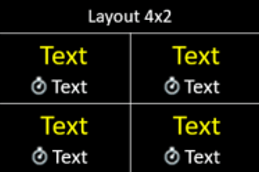 ```java Java theme={null}
// allocate layout
marshall_t.msg_display_control_t.layout_t ui_context = m_vmc.general.display_control_create_layout(4);
// add label
m_vmc.general.display_control_layout_add_label(ui_context, 0, 0, "Layout 4x2");
m_vmc.general.display_control_layout_add_label(ui_context, 1, 0, "Text");
m_vmc.general.display_control_layout_add_label(ui_context, 1, 1, "%cText");
m_vmc.general.display_control_layout_add_label(ui_context, 2, 0, "Text");
m_vmc.general.display_control_layout_add_label(ui_context, 2, 1, "%cText");
m_vmc.general.display_control_layout_add_label(ui_context, 3, 0, "Text");
m_vmc.general.display_control_layout_add_label(ui_context, 3, 1, "%cText");
m_vmc.general.display_control_layout_add_label(ui_context, 4, 0, "Text");
m_vmc.general.display_control_layout_add_label(ui_context, 4, 1, "%cText");
// apply layout on screen
m_vmc.general.display_control_apply_layout(ui_context);
```
```csharp C# theme={null}
// allocate layout
Object ui_context = vmc_instance.general.display_control_create_layout(4);
// add label
vmc_instance.general.display_control_layout_add_label(ui_context, 0, 0, "Layout 4x2");
vmc_instance.general.display_control_layout_add_label(ui_context, 1, 0, "Text");
vmc_instance.general.display_control_layout_add_label(ui_context, 1, 1, "%cText");
vmc_instance.general.display_control_layout_add_label(ui_context, 2, 0, "Text");
vmc_instance.general.display_control_layout_add_label(ui_context, 2, 1, "%cText");
vmc_instance.general.display_control_layout_add_label(ui_context, 3, 0, "Text");
vmc_instance.general.display_control_layout_add_label(ui_context, 3, 1, "%cText");
vmc_instance.general.display_control_layout_add_label(ui_context, 4, 0, "Text");
vmc_instance.general.display_control_layout_add_label(ui_context, 4, 1, "%cText");
// apply layout on screen
vmc_instance.general.display_control_apply_layout(ui_context);
```
```c C theme={null}
static void handler_display_control(void *aux_data)
{
display_t display;
layout_t layout;
label_t labels[30];
int index = 0;
__strcpy(labels[index].label, "Layout 4x2");
labels[index].object_id = index;
labels[index].label_num_in_layout = index;
index++;
for (; index < 4; index++)
{
label_t *lbl = &labels[index];
sprintf(lbl->label, "Text");
lbl->object_id = index;
lbl->label_num_in_layout = 0;
label_t *lbl = &labels[index];
sprintf(lbl->label, "%cText");
lbl->object_id = index;
lbl->label_num_in_layout = 1;
}
layout.layout_id = 4; // 4x2
layout.labels_num = 9;
layout.buttons_num = 0;
vmc_general_apply_display_control(&display);
}
```
### Layout ID 5
```java Java theme={null}
// allocate layout
marshall_t.msg_display_control_t.layout_t ui_context = m_vmc.general.display_control_create_layout(4);
// add label
m_vmc.general.display_control_layout_add_label(ui_context, 0, 0, "Layout 4x2");
m_vmc.general.display_control_layout_add_label(ui_context, 1, 0, "Text");
m_vmc.general.display_control_layout_add_label(ui_context, 1, 1, "%cText");
m_vmc.general.display_control_layout_add_label(ui_context, 2, 0, "Text");
m_vmc.general.display_control_layout_add_label(ui_context, 2, 1, "%cText");
m_vmc.general.display_control_layout_add_label(ui_context, 3, 0, "Text");
m_vmc.general.display_control_layout_add_label(ui_context, 3, 1, "%cText");
m_vmc.general.display_control_layout_add_label(ui_context, 4, 0, "Text");
m_vmc.general.display_control_layout_add_label(ui_context, 4, 1, "%cText");
// apply layout on screen
m_vmc.general.display_control_apply_layout(ui_context);
```
```csharp C# theme={null}
// allocate layout
Object ui_context = vmc_instance.general.display_control_create_layout(4);
// add label
vmc_instance.general.display_control_layout_add_label(ui_context, 0, 0, "Layout 4x2");
vmc_instance.general.display_control_layout_add_label(ui_context, 1, 0, "Text");
vmc_instance.general.display_control_layout_add_label(ui_context, 1, 1, "%cText");
vmc_instance.general.display_control_layout_add_label(ui_context, 2, 0, "Text");
vmc_instance.general.display_control_layout_add_label(ui_context, 2, 1, "%cText");
vmc_instance.general.display_control_layout_add_label(ui_context, 3, 0, "Text");
vmc_instance.general.display_control_layout_add_label(ui_context, 3, 1, "%cText");
vmc_instance.general.display_control_layout_add_label(ui_context, 4, 0, "Text");
vmc_instance.general.display_control_layout_add_label(ui_context, 4, 1, "%cText");
// apply layout on screen
vmc_instance.general.display_control_apply_layout(ui_context);
```
```c C theme={null}
static void handler_display_control(void *aux_data)
{
display_t display;
layout_t layout;
label_t labels[30];
int index = 0;
__strcpy(labels[index].label, "Layout 4x2");
labels[index].object_id = index;
labels[index].label_num_in_layout = index;
index++;
for (; index < 4; index++)
{
label_t *lbl = &labels[index];
sprintf(lbl->label, "Text");
lbl->object_id = index;
lbl->label_num_in_layout = 0;
label_t *lbl = &labels[index];
sprintf(lbl->label, "%cText");
lbl->object_id = index;
lbl->label_num_in_layout = 1;
}
layout.layout_id = 4; // 4x2
layout.labels_num = 9;
layout.buttons_num = 0;
vmc_general_apply_display_control(&display);
}
```
### Layout ID 5
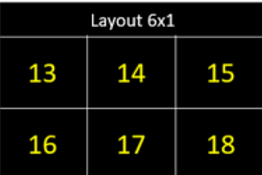 ```java Java theme={null}
// allocate layout
marshall_t.msg_display_control_t.layout_t ui_context = m_vmc.general.display_control_create_layout(5);
// add label
m_vmc.general.display_control_layout_add_label(ui_context, 0, 0, "Layout 6x1");
m_vmc.general.display_control_layout_add_label(ui_context, 1, 0, "13");
m_vmc.general.display_control_layout_add_label(ui_context, 2, 0, "14");
m_vmc.general.display_control_layout_add_label(ui_context, 3, 0, "15");
m_vmc.general.display_control_layout_add_label(ui_context, 4, 0, "16");
m_vmc.general.display_control_layout_add_label(ui_context, 5, 0, "17");
m_vmc.general.display_control_layout_add_label(ui_context, 6, 0, "18");
// apply layout on screen
m_vmc.general.display_control_apply_layout(ui_context);
```
```csharp C# theme={null}
// allocate layout
Object ui_context = vmc_instance.general.display_control_create_layout(5);
// add label
vmc_instance.general.display_control_layout_add_label(ui_context, 0, 0, "Layout 4x2");
vmc_instance.general.display_control_layout_add_label(ui_context, 1, 0, "13");
vmc_instance.general.display_control_layout_add_label(ui_context, 2, 0, "14");
vmc_instance.general.display_control_layout_add_label(ui_context, 3, 0, "15");
vmc_instance.general.display_control_layout_add_label(ui_context, 4, 0, "16");
vmc_instance.general.display_control_layout_add_label(ui_context, 5, 0, "17");
vmc_instance.general.display_control_layout_add_label(ui_context, 6, 0, "18");
// apply layout on screen
vmc_instance.general.display_control_apply_layout(ui_context);
```
```c C theme={null}
static void handler_display_control(void *aux_data)
{
display_t display;
layout_t layout;
label_t labels[30];
int index = 0;
__strcpy(labels[index].label, "Layout 6x1");
labels[index].object_id = index;
labels[index].label_num_in_layout = index;
index++;
for (; index < 6; index++)
{
label_t *lbl = &labels[index];
sprintf(lbl->label, "%d", index);
lbl->object_id = index;
lbl->label_num_in_layout = 0;
}
layout.layout_id = 5; // 6x1
layout.labels_num = 7;
layout.buttons_num = 0;
vmc_general_apply_display_control(&display);
}
```
### Layout ID 6
```java Java theme={null}
// allocate layout
marshall_t.msg_display_control_t.layout_t ui_context = m_vmc.general.display_control_create_layout(5);
// add label
m_vmc.general.display_control_layout_add_label(ui_context, 0, 0, "Layout 6x1");
m_vmc.general.display_control_layout_add_label(ui_context, 1, 0, "13");
m_vmc.general.display_control_layout_add_label(ui_context, 2, 0, "14");
m_vmc.general.display_control_layout_add_label(ui_context, 3, 0, "15");
m_vmc.general.display_control_layout_add_label(ui_context, 4, 0, "16");
m_vmc.general.display_control_layout_add_label(ui_context, 5, 0, "17");
m_vmc.general.display_control_layout_add_label(ui_context, 6, 0, "18");
// apply layout on screen
m_vmc.general.display_control_apply_layout(ui_context);
```
```csharp C# theme={null}
// allocate layout
Object ui_context = vmc_instance.general.display_control_create_layout(5);
// add label
vmc_instance.general.display_control_layout_add_label(ui_context, 0, 0, "Layout 4x2");
vmc_instance.general.display_control_layout_add_label(ui_context, 1, 0, "13");
vmc_instance.general.display_control_layout_add_label(ui_context, 2, 0, "14");
vmc_instance.general.display_control_layout_add_label(ui_context, 3, 0, "15");
vmc_instance.general.display_control_layout_add_label(ui_context, 4, 0, "16");
vmc_instance.general.display_control_layout_add_label(ui_context, 5, 0, "17");
vmc_instance.general.display_control_layout_add_label(ui_context, 6, 0, "18");
// apply layout on screen
vmc_instance.general.display_control_apply_layout(ui_context);
```
```c C theme={null}
static void handler_display_control(void *aux_data)
{
display_t display;
layout_t layout;
label_t labels[30];
int index = 0;
__strcpy(labels[index].label, "Layout 6x1");
labels[index].object_id = index;
labels[index].label_num_in_layout = index;
index++;
for (; index < 6; index++)
{
label_t *lbl = &labels[index];
sprintf(lbl->label, "%d", index);
lbl->object_id = index;
lbl->label_num_in_layout = 0;
}
layout.layout_id = 5; // 6x1
layout.labels_num = 7;
layout.buttons_num = 0;
vmc_general_apply_display_control(&display);
}
```
### Layout ID 6
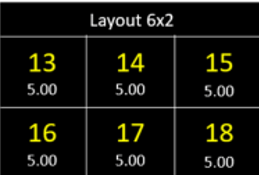 ```java Java theme={null}
// allocate layout
marshall_t.msg_display_control_t.layout_t ui_context = m_vmc.general.display_control_create_layout(6);
// add label
m_vmc.general.display_control_layout_add_label(ui_context, 0, 0, "Layout 6x2");
m_vmc.general.display_control_layout_add_label(ui_context, 1, 0, "13");
m_vmc.general.display_control_layout_add_label(ui_context, 1, 1, "5");
m_vmc.general.display_control_layout_add_label(ui_context, 2, 0, "14");
m_vmc.general.display_control_layout_add_label(ui_context, 2, 1, "5");
m_vmc.general.display_control_layout_add_label(ui_context, 3, 0, "15");
m_vmc.general.display_control_layout_add_label(ui_context, 3, 1, "5");
m_vmc.general.display_control_layout_add_label(ui_context, 4, 0, "16");
m_vmc.general.display_control_layout_add_label(ui_context, 4, 1, "5");
m_vmc.general.display_control_layout_add_label(ui_context, 5, 0, "17");
m_vmc.general.display_control_layout_add_label(ui_context, 5, 1, "5");
m_vmc.general.display_control_layout_add_label(ui_context, 6, 0, "18");
m_vmc.general.display_control_layout_add_label(ui_context, 6, 1, "5");
// apply layout on screen
m_vmc.general.display_control_apply_layout(ui_context);
```
```csharp C# theme={null}
// allocate layout
Object ui_context = vmc_instance.general.display_control_create_layout(6);
// add label
vmc_instance.general.display_control_layout_add_label(ui_context, 0, 0, "Layout 6x2");
vmc_instance.general.display_control_layout_add_label(ui_context, 1, 0, "13");
vmc_instance.general.display_control_layout_add_label(ui_context, 1, 1, "5");
vmc_instance.general.display_control_layout_add_label(ui_context, 2, 0, "14");
vmc_instance.general.display_control_layout_add_label(ui_context, 2, 1, "5");
vmc_instance.general.display_control_layout_add_label(ui_context, 3, 0, "15");
vmc_instance.general.display_control_layout_add_label(ui_context, 3, 1, "5");
vmc_instance.general.display_control_layout_add_label(ui_context, 4, 0, "16");
vmc_instance.general.display_control_layout_add_label(ui_context, 4, 1, "5");
vmc_instance.general.display_control_layout_add_label(ui_context, 5, 0, "17");
vmc_instance.general.display_control_layout_add_label(ui_context, 5, 1, "5");
vmc_instance.general.display_control_layout_add_label(ui_context, 6, 0, "18");
vmc_instance.general.display_control_layout_add_label(ui_context, 6, 1, "5");
// apply layout on screen
vmc_instance.general.display_control_apply_layout(ui_context);
```
```c C theme={null}
static void handler_display_control(void *aux_data)
{
display_t display;
layout_t layout;
label_t labels[30];
int index = 0;
__strcpy(labels[index].label, "Layout 6x2");
labels[index].object_id = index;
labels[index].label_num_in_layout = index;
index++;
for (; index < 6; index++)
{
label_t *lbl = &labels[index];
sprintf(lbl->label, "%d", index);
lbl->object_id = index;
lbl->label_num_in_layout = 0;
label_t *lbl = &labels[index];
sprintf(lbl->label, "5");
lbl->object_id = index;
lbl->label_num_in_layout = 1;
}
layout.layout_id = 6; // 6x2
layout.labels_num = 13;
layout.buttons_num = 0;
vmc_general_apply_display_control(&display);
}
```
### Layout ID 7
```java Java theme={null}
// allocate layout
marshall_t.msg_display_control_t.layout_t ui_context = m_vmc.general.display_control_create_layout(6);
// add label
m_vmc.general.display_control_layout_add_label(ui_context, 0, 0, "Layout 6x2");
m_vmc.general.display_control_layout_add_label(ui_context, 1, 0, "13");
m_vmc.general.display_control_layout_add_label(ui_context, 1, 1, "5");
m_vmc.general.display_control_layout_add_label(ui_context, 2, 0, "14");
m_vmc.general.display_control_layout_add_label(ui_context, 2, 1, "5");
m_vmc.general.display_control_layout_add_label(ui_context, 3, 0, "15");
m_vmc.general.display_control_layout_add_label(ui_context, 3, 1, "5");
m_vmc.general.display_control_layout_add_label(ui_context, 4, 0, "16");
m_vmc.general.display_control_layout_add_label(ui_context, 4, 1, "5");
m_vmc.general.display_control_layout_add_label(ui_context, 5, 0, "17");
m_vmc.general.display_control_layout_add_label(ui_context, 5, 1, "5");
m_vmc.general.display_control_layout_add_label(ui_context, 6, 0, "18");
m_vmc.general.display_control_layout_add_label(ui_context, 6, 1, "5");
// apply layout on screen
m_vmc.general.display_control_apply_layout(ui_context);
```
```csharp C# theme={null}
// allocate layout
Object ui_context = vmc_instance.general.display_control_create_layout(6);
// add label
vmc_instance.general.display_control_layout_add_label(ui_context, 0, 0, "Layout 6x2");
vmc_instance.general.display_control_layout_add_label(ui_context, 1, 0, "13");
vmc_instance.general.display_control_layout_add_label(ui_context, 1, 1, "5");
vmc_instance.general.display_control_layout_add_label(ui_context, 2, 0, "14");
vmc_instance.general.display_control_layout_add_label(ui_context, 2, 1, "5");
vmc_instance.general.display_control_layout_add_label(ui_context, 3, 0, "15");
vmc_instance.general.display_control_layout_add_label(ui_context, 3, 1, "5");
vmc_instance.general.display_control_layout_add_label(ui_context, 4, 0, "16");
vmc_instance.general.display_control_layout_add_label(ui_context, 4, 1, "5");
vmc_instance.general.display_control_layout_add_label(ui_context, 5, 0, "17");
vmc_instance.general.display_control_layout_add_label(ui_context, 5, 1, "5");
vmc_instance.general.display_control_layout_add_label(ui_context, 6, 0, "18");
vmc_instance.general.display_control_layout_add_label(ui_context, 6, 1, "5");
// apply layout on screen
vmc_instance.general.display_control_apply_layout(ui_context);
```
```c C theme={null}
static void handler_display_control(void *aux_data)
{
display_t display;
layout_t layout;
label_t labels[30];
int index = 0;
__strcpy(labels[index].label, "Layout 6x2");
labels[index].object_id = index;
labels[index].label_num_in_layout = index;
index++;
for (; index < 6; index++)
{
label_t *lbl = &labels[index];
sprintf(lbl->label, "%d", index);
lbl->object_id = index;
lbl->label_num_in_layout = 0;
label_t *lbl = &labels[index];
sprintf(lbl->label, "5");
lbl->object_id = index;
lbl->label_num_in_layout = 1;
}
layout.layout_id = 6; // 6x2
layout.labels_num = 13;
layout.buttons_num = 0;
vmc_general_apply_display_control(&display);
}
```
### Layout ID 7
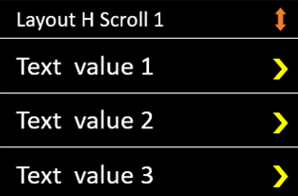 \*\*Note: \*\*You can have up to 6 values: values 4-6 would appear once you scroll down.
```java Java theme={null}
// allocate layout
marshall_t.msg_display_control_t.layout_t ui_context = m_vmc.general.display_control_create_layout(7);
// add label
m_vmc.general.display_control_layout_add_label(ui_context, 0, 0, "Layout H Scroll 1");
m_vmc.general.display_control_layout_add_label(ui_context, 1, 0, "Text value 1");
m_vmc.general.display_control_layout_add_label(ui_context, 2, 0, "Text value 2");
m_vmc.general.display_control_layout_add_label(ui_context, 3, 0, "Text value 3");
m_vmc.general.display_control_layout_add_label(ui_context, 4, 0, "Text value 4");
m_vmc.general.display_control_layout_add_label(ui_context, 5, 0, "Text value 5");
m_vmc.general.display_control_layout_add_label(ui_context, 6, 0, "Text value 6");
// apply layout on screen
m_vmc.general.display_control_apply_layout(ui_context);
```
```csharp C# theme={null}
// allocate layout
Object ui_context = vmc_instance.general.display_control_create_layout(7);
// add label
vmc_instance.general.display_control_layout_add_label(ui_context, 0, 0, "Layout H Scroll 1");
vmc_instance.general.display_control_layout_add_label(ui_context, 1, 0, "Text value 1");
vmc_instance.general.display_control_layout_add_label(ui_context, 2, 0, "Text value 2");
vmc_instance.general.display_control_layout_add_label(ui_context, 3, 0, "Text value 3");
vmc_instance.general.display_control_layout_add_label(ui_context, 4, 0, "Text value 4");
vmc_instance.general.display_control_layout_add_label(ui_context, 5, 0, "Text value 5");
vmc_instance.general.display_control_layout_add_label(ui_context, 6, 0, "Text value 6");
// apply layout on screen
vmc_instance.general.display_control_apply_layout(ui_context);
```
```c C theme={null}
static void handler_display_control(void *aux_data)
{
display_t display;
layout_t layout;
label_t labels[30];
int index = 0;
__strcpy(labels[index].label, "Layout H Scroll 1");
labels[index].object_id = index;
labels[index].label_num_in_layout = index;
index++;
for (; index < 6; index++)
{
label_t *lbl = &labels[index];
sprintf(lbl->label, "Text value %d", index);
lbl->object_id = index;
lbl->label_num_in_layout = 0;
}
layout.layout_id = 7; // Layout H Scroll 1
layout.labels_num = 7;
layout.buttons_num = 0;
vmc_general_apply_display_control(&display);
}
```
### Layout ID 8
\*\*Note: \*\*You can have up to 6 values: values 4-6 would appear once you scroll down.
```java Java theme={null}
// allocate layout
marshall_t.msg_display_control_t.layout_t ui_context = m_vmc.general.display_control_create_layout(7);
// add label
m_vmc.general.display_control_layout_add_label(ui_context, 0, 0, "Layout H Scroll 1");
m_vmc.general.display_control_layout_add_label(ui_context, 1, 0, "Text value 1");
m_vmc.general.display_control_layout_add_label(ui_context, 2, 0, "Text value 2");
m_vmc.general.display_control_layout_add_label(ui_context, 3, 0, "Text value 3");
m_vmc.general.display_control_layout_add_label(ui_context, 4, 0, "Text value 4");
m_vmc.general.display_control_layout_add_label(ui_context, 5, 0, "Text value 5");
m_vmc.general.display_control_layout_add_label(ui_context, 6, 0, "Text value 6");
// apply layout on screen
m_vmc.general.display_control_apply_layout(ui_context);
```
```csharp C# theme={null}
// allocate layout
Object ui_context = vmc_instance.general.display_control_create_layout(7);
// add label
vmc_instance.general.display_control_layout_add_label(ui_context, 0, 0, "Layout H Scroll 1");
vmc_instance.general.display_control_layout_add_label(ui_context, 1, 0, "Text value 1");
vmc_instance.general.display_control_layout_add_label(ui_context, 2, 0, "Text value 2");
vmc_instance.general.display_control_layout_add_label(ui_context, 3, 0, "Text value 3");
vmc_instance.general.display_control_layout_add_label(ui_context, 4, 0, "Text value 4");
vmc_instance.general.display_control_layout_add_label(ui_context, 5, 0, "Text value 5");
vmc_instance.general.display_control_layout_add_label(ui_context, 6, 0, "Text value 6");
// apply layout on screen
vmc_instance.general.display_control_apply_layout(ui_context);
```
```c C theme={null}
static void handler_display_control(void *aux_data)
{
display_t display;
layout_t layout;
label_t labels[30];
int index = 0;
__strcpy(labels[index].label, "Layout H Scroll 1");
labels[index].object_id = index;
labels[index].label_num_in_layout = index;
index++;
for (; index < 6; index++)
{
label_t *lbl = &labels[index];
sprintf(lbl->label, "Text value %d", index);
lbl->object_id = index;
lbl->label_num_in_layout = 0;
}
layout.layout_id = 7; // Layout H Scroll 1
layout.labels_num = 7;
layout.buttons_num = 0;
vmc_general_apply_display_control(&display);
}
```
### Layout ID 8
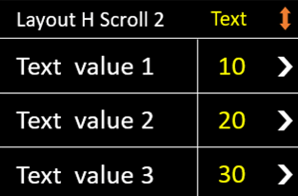 \*\*Note: \*\*You can have up to 6 values: values 4-6 would appear once you scroll down.
```java Java theme={null}
// allocate layout
marshall_t.msg_display_control_t.layout_t ui_context = m_vmc.general.display_control_create_layout(8);
// add label
m_vmc.general.display_control_layout_add_label(ui_context, 0, 0, "Layout H Scroll 2");
m_vmc.general.display_control_layout_add_label(ui_context, 1, 0, "Text value 1");
m_vmc.general.display_control_layout_add_label(ui_context, 1, 1, "10");
m_vmc.general.display_control_layout_add_label(ui_context, 2, 0, "Text value 2");
m_vmc.general.display_control_layout_add_label(ui_context, 2, 1, "20");
m_vmc.general.display_control_layout_add_label(ui_context, 3, 0, "Text value 3");
m_vmc.general.display_control_layout_add_label(ui_context, 3, 1, "30");
m_vmc.general.display_control_layout_add_label(ui_context, 4, 0, "Text value 4");
m_vmc.general.display_control_layout_add_label(ui_context, 4, 1, "40");
m_vmc.general.display_control_layout_add_label(ui_context, 5, 0, "Text value 5");
m_vmc.general.display_control_layout_add_label(ui_context, 5, 1, "50");
m_vmc.general.display_control_layout_add_label(ui_context, 6, 0, "Text value 6");
m_vmc.general.display_control_layout_add_label(ui_context, 6, 1, "60");
// apply layout on screen
m_vmc.general.display_control_apply_layout(ui_context);
```
```csharp C# theme={null}
// allocate layout
Object ui_context = vmc_instance.general.display_control_create_layout(8);
// add label
vmc_instance.general.display_control_layout_add_label(ui_context, 0, 0, "Layout H Scroll 1");
vmc_instance.general.display_control_layout_add_label(ui_context, 1, 0, "Text value 1");
vmc_instance.general.display_control_layout_add_label(ui_context, 1, 1, "10");
vmc_instance.general.display_control_layout_add_label(ui_context, 2, 0, "Text value 2");
vmc_instance.general.display_control_layout_add_label(ui_context, 2, 1, "20");
vmc_instance.general.display_control_layout_add_label(ui_context, 3, 0, "Text value 3");
vmc_instance.general.display_control_layout_add_label(ui_context, 3, 1, "30");
vmc_instance.general.display_control_layout_add_label(ui_context, 4, 0, "Text value 4");
vmc_instance.general.display_control_layout_add_label(ui_context, 4, 1, "40");
vmc_instance.general.display_control_layout_add_label(ui_context, 5, 0, "Text value 5");
vmc_instance.general.display_control_layout_add_label(ui_context, 5, 1, "50");
vmc_instance.general.display_control_layout_add_label(ui_context, 6, 0, "Text value 6");
vmc_instance.general.display_control_layout_add_label(ui_context, 6, 1, "60");
// apply layout on screen
vmc_instance.general.display_control_apply_layout(ui_context);
```
```c C theme={null}
static void handler_display_control(void *aux_data)
{
display_t display;
layout_t layout;
label_t labels[30];
int index = 0;
__strcpy(labels[index].label, "Layout H Scroll 1");
labels[index].object_id = index;
labels[index].label_num_in_layout = index;
index++;
for (; index < 6; index++)
{
label_t *lbl = &labels[index];
sprintf(lbl->label, "Text value %d", index);
lbl->object_id = index;
lbl->label_num_in_layout = 0;
label_t *lbl = &labels[index];
label_price= index*10;
sprintf(lbl->label, "%d", label_price);
lbl->object_id = index;
lbl->label_num_in_layout = 1;
}
layout.layout_id = 8; // Layout H Scroll 2
layout.labels_num = 13;
layout.buttons_num = 0;
vmc_general_apply_display_control(&display);
}
```
### Layout ID 9- VPOSM only!
\*\*Note: \*\*You can have up to 6 values: values 4-6 would appear once you scroll down.
```java Java theme={null}
// allocate layout
marshall_t.msg_display_control_t.layout_t ui_context = m_vmc.general.display_control_create_layout(8);
// add label
m_vmc.general.display_control_layout_add_label(ui_context, 0, 0, "Layout H Scroll 2");
m_vmc.general.display_control_layout_add_label(ui_context, 1, 0, "Text value 1");
m_vmc.general.display_control_layout_add_label(ui_context, 1, 1, "10");
m_vmc.general.display_control_layout_add_label(ui_context, 2, 0, "Text value 2");
m_vmc.general.display_control_layout_add_label(ui_context, 2, 1, "20");
m_vmc.general.display_control_layout_add_label(ui_context, 3, 0, "Text value 3");
m_vmc.general.display_control_layout_add_label(ui_context, 3, 1, "30");
m_vmc.general.display_control_layout_add_label(ui_context, 4, 0, "Text value 4");
m_vmc.general.display_control_layout_add_label(ui_context, 4, 1, "40");
m_vmc.general.display_control_layout_add_label(ui_context, 5, 0, "Text value 5");
m_vmc.general.display_control_layout_add_label(ui_context, 5, 1, "50");
m_vmc.general.display_control_layout_add_label(ui_context, 6, 0, "Text value 6");
m_vmc.general.display_control_layout_add_label(ui_context, 6, 1, "60");
// apply layout on screen
m_vmc.general.display_control_apply_layout(ui_context);
```
```csharp C# theme={null}
// allocate layout
Object ui_context = vmc_instance.general.display_control_create_layout(8);
// add label
vmc_instance.general.display_control_layout_add_label(ui_context, 0, 0, "Layout H Scroll 1");
vmc_instance.general.display_control_layout_add_label(ui_context, 1, 0, "Text value 1");
vmc_instance.general.display_control_layout_add_label(ui_context, 1, 1, "10");
vmc_instance.general.display_control_layout_add_label(ui_context, 2, 0, "Text value 2");
vmc_instance.general.display_control_layout_add_label(ui_context, 2, 1, "20");
vmc_instance.general.display_control_layout_add_label(ui_context, 3, 0, "Text value 3");
vmc_instance.general.display_control_layout_add_label(ui_context, 3, 1, "30");
vmc_instance.general.display_control_layout_add_label(ui_context, 4, 0, "Text value 4");
vmc_instance.general.display_control_layout_add_label(ui_context, 4, 1, "40");
vmc_instance.general.display_control_layout_add_label(ui_context, 5, 0, "Text value 5");
vmc_instance.general.display_control_layout_add_label(ui_context, 5, 1, "50");
vmc_instance.general.display_control_layout_add_label(ui_context, 6, 0, "Text value 6");
vmc_instance.general.display_control_layout_add_label(ui_context, 6, 1, "60");
// apply layout on screen
vmc_instance.general.display_control_apply_layout(ui_context);
```
```c C theme={null}
static void handler_display_control(void *aux_data)
{
display_t display;
layout_t layout;
label_t labels[30];
int index = 0;
__strcpy(labels[index].label, "Layout H Scroll 1");
labels[index].object_id = index;
labels[index].label_num_in_layout = index;
index++;
for (; index < 6; index++)
{
label_t *lbl = &labels[index];
sprintf(lbl->label, "Text value %d", index);
lbl->object_id = index;
lbl->label_num_in_layout = 0;
label_t *lbl = &labels[index];
label_price= index*10;
sprintf(lbl->label, "%d", label_price);
lbl->object_id = index;
lbl->label_num_in_layout = 1;
}
layout.layout_id = 8; // Layout H Scroll 2
layout.labels_num = 13;
layout.buttons_num = 0;
vmc_general_apply_display_control(&display);
}
```
### Layout ID 9- VPOSM only!
 ```java Java theme={null}
m_vmc.general.display_control_layout_add_label(ui_context, 0, 0, "Do You Want A Receipt?");
m_vmc.general.display_control_layout_add_label(ui_context, 1, 0, "Yes");
m_vmc.general.display_control_layout_add_label(ui_context, 1, 1, "@shapes/positive");
m_vmc.general.display_control_layout_add_label(ui_context, 2, 0, "No");
m_vmc.general.display_control_layout_add_label(ui_context, 2, 1, "@shapes/square");
```
```csharp C# theme={null}
vmc_instance.general.display_control_layout_add_label(ui_context, 0, 0, "Do You Want A Receipt?");
vmc_instance.general.display_control_layout_add_label(ui_context, 1, 0, "Yes");
vmc_instance.general.display_control_layout_add_label(ui_context, 1, 1, "@shapes/positive");
vmc_instance.general.display_control_layout_add_label(ui_context, 2, 0, "No");
vmc_instance.general.display_control_layout_add_label(ui_context, 2, 1, "@shapes/square");
```
```c C theme={null}
WIP
```
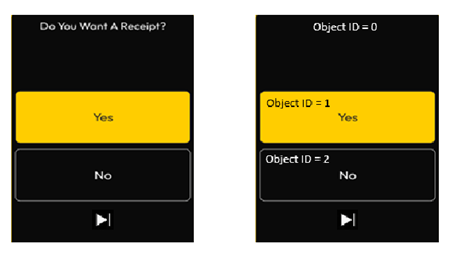
One or two big buttons will appear in the middle. The first is in yellow and text in black, and the other (if it exists) is in black with text in white.
### Layout ID 10- VPOSM Only
```java Java theme={null}
m_vmc.general.display_control_layout_add_label(ui_context, 0, 0, "Do You Want A Receipt?");
m_vmc.general.display_control_layout_add_label(ui_context, 1, 0, "Yes");
m_vmc.general.display_control_layout_add_label(ui_context, 1, 1, "@shapes/positive");
m_vmc.general.display_control_layout_add_label(ui_context, 2, 0, "No");
m_vmc.general.display_control_layout_add_label(ui_context, 2, 1, "@shapes/square");
```
```csharp C# theme={null}
vmc_instance.general.display_control_layout_add_label(ui_context, 0, 0, "Do You Want A Receipt?");
vmc_instance.general.display_control_layout_add_label(ui_context, 1, 0, "Yes");
vmc_instance.general.display_control_layout_add_label(ui_context, 1, 1, "@shapes/positive");
vmc_instance.general.display_control_layout_add_label(ui_context, 2, 0, "No");
vmc_instance.general.display_control_layout_add_label(ui_context, 2, 1, "@shapes/square");
```
```c C theme={null}
WIP
```
One or two big buttons will appear in the middle. The first is in yellow and text in black, and the other (if it exists) is in black with text in white.
### Layout ID 10- VPOSM Only
 ```java Java theme={null}
m_vmc.general.display_control_layout_add_label(ui_context, 0, 0, "Ready To refuel");
// add label
m_vmc.general.display_control_layout_add_media(ui_context, 1, "@assets/x_red.png");
```
```csharp C# theme={null}
vmc_instance.general.display_control_layout_add_label(ui_context, 0, 0, "Ready To refuel");
// add label
vmc_instance.general.display_control_layout_add_media(ui_context, 1, "@assets/x_red.png");
```
```c C theme={null}
WIP
```
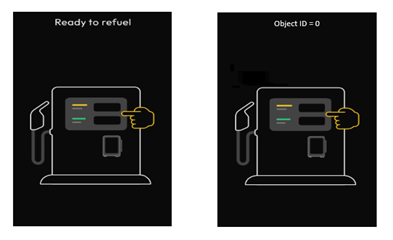
Including title (optional, can be Null), and the element to be presented (Image/Animation).
### Layout ID 11- VPOSM Only
```java Java theme={null}
m_vmc.general.display_control_layout_add_label(ui_context, 0, 0, "Ready To refuel");
// add label
m_vmc.general.display_control_layout_add_media(ui_context, 1, "@assets/x_red.png");
```
```csharp C# theme={null}
vmc_instance.general.display_control_layout_add_label(ui_context, 0, 0, "Ready To refuel");
// add label
vmc_instance.general.display_control_layout_add_media(ui_context, 1, "@assets/x_red.png");
```
```c C theme={null}
WIP
```
Including title (optional, can be Null), and the element to be presented (Image/Animation).
### Layout ID 11- VPOSM Only
 ```java Java theme={null}
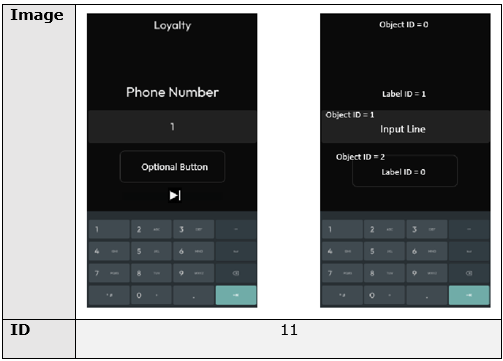
m_vmc.general.display_control_layout_add_label(ui_context, 0, 0, "Loyalty");
m_vmc.general.display_control_layout_add_input(ui_context, 1, 1, 15, "Phone Number");
//for the optional button:
m_vmc.general.display_control_layout_add_label(ui_context, 2, 0, "Optional Button");
```
```csharp C# theme={null}
vmc_instance.general.display_control_layout_add_label(ui_context, 0, 0, "Loyalty");
vmc_instance.general.display_control_layout_add_input(ui_context, 1, 1, 15, "Phone Number");
//for the optional button:
vmc_instance.display_control_layout_add_label(ui_context, 2, 0, "Optional Button");
```
```c C theme={null}
WIP
```
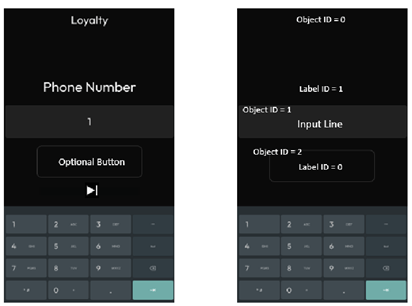
Including: Title, Subtitle, and Input Field
## Nayax Core configurations
**Important:**
This feature is supported only in **“Always Idle”** mode. This means that you need to have "Always Idle" configuration set up *both on the device level (via Nayax Core) as well as have it be set to "true" on the peripheral level (via the SDK)*
You can see the flag's location in the [SDK Flags](/docs/integrate-pos-device/marshall/get-started/sdk-flags-descriptions#/)page, under "Configurations flags".
| Attribute Group | Attribute Name | Attribute Value |
| :--------------- | :---------------------------- | :------------------------------------ |
| **MDB** | Cashless MDB address | Marshall VMC |
| | MDB flags | 02 Preselection Enabled |
| | MDB Level 3 Optional Features | Enable “Always Idle” state |
| **Card Readers** | Card Reader MDB Level | 3 |
| | Transaction start method | Product |
| | Transaction Start Ignore List | Ignore None |
| | VPOS Read Source Enabled | All Read Sources Enabled (Default) |
| | VPOS Button Function | 01 External cancel |
| **Payment** | Choose Product Timeout | > 0 |
| | Default Credit | > 0 (highest product's amount) |
| | EMV Price Table | C%100 |
| | Payment Flags | Allow Pre-Selection on Pre-Paid cards |
| **VMC** | Session Time Out (minutes) | > 0 |
## Updating the Screens via Nayax Core
A Nayax Core attribute has been introduced that allows operators to dynamically update text, prices, and configurations on selection screens- the screens that appear when the device is in idle mode, waiting for a consumer to select a product by selecting (touching) one of said screens.
This attribute enables sending structured data from Nayax Core to the peripheral. This information is then processed and displayed on the Marshall selection screen.
The attribute definition is as follows:
| Attribute | Value |
| ------------------ | --------------------- |
| **ID** | 7700 |
| **Name** | Marshall Screens Info |
| **Group** | VMC |
| **Maximum Length** | 400 characters |
This sends a JSON-formatted string containing details about selection screens, including layout configurations, text labels, prices, and timing.
## JSON Logic Recommendation
The JSON string should include necessary instructions for each selection screen. The format is flexible, allowing operators to specify only the required parameters.
See the structure in the code block below:
```json theme={null}
{
"Screen Name 1": {
"layout_id": ,
"content": {
"layout_title": "",
"text_1": "<text>",
"text_2": "<text>",
"text_3": "<text>",
"text_4": "<text>"
},
"prices": {
"price_1": "<price>",
"price_2": "<price>"
},
"timing": {
"time_1": "<time>",
"time_2": "<time>"
},
"buttons": "<comma-separated list of button IDs>"
},
"Screen Name 2": {
"layout_id": <ID>,
"content": { ... },
"prices": { ... }
}
}
```
<Warning>
**Validate the JSON**
**The JSON validity and defined prices are solely the operator's responsibility.**
It is highly recommended to validate the JSON using a JSON validator before sending it to a remote machine since incorrectly formatted JSON may cause display errors or unexpected behavior.
</Warning>
## Example
See the JSON below. It is sending the instructions to update the display of an Air Vac machine.
```json theme={null}
{
"Select product from 2 options": {
"layout_id": 2,
"content": {
"layout_title": "Select Air/Vac",
"text_1": "Air",
"text_2": "$2",
"text_3": "%c 5 min",
"text_4": "Vac",
"text_5": "$3",
"text_6": "%c 10 min"
},
"prices": {
"price_1": "2",
"price_2": "3"
},
"buttons": "104"
}
}
```
The packet built from this JSON is the following:
```
Packet = 0x01 0x02 0x0100
0x02 0x0C 0x00 0x00 “Select Air/Vac”
0x02 0x08 0x01 0x00 “Air”
0x02 0x08 0x01 0x01 “$2”
0x02 0x08 0x01 0x02 “%c 5 min”
0x02 0x08 0x02 0x00 “Vac”
0x02 0x08 0x02 0x01 “$3”
0x02 0x08 0x02 0x02 “%c 10 min”
0x03 0x01 0x68
```
<Note>
**Packet Creation**
Packets are created automatically by the SDK or Nayax Core.
</Note>
The image below would be the display result.
<Frame>
<img src="https://mintcdn.com/nayax-44d6e37b-docs-marshall-faq-redistribution/Hbgg7w3lQTggebWl/images/docs/marshall-display/image1.png?fit=max&auto=format&n=Hbgg7w3lQTggebWl&q=85&s=0d738865c21d9dc4fe6e4f0d8875ca87" alt="" width="480" height="322" data-path="images/docs/marshall-display/image1.png" />
</Frame>
## Customize the Idle Screen and Transaction UI
Beyond the selection screens, a limited set of idle-state and transaction-state elements can be customized from the DCS back office. The list below is everything that is currently available.
Select the pictures or animations shown while the device is idle. You can also add a custom image, such as your company logo.
<Frame>
<img src="https://mintcdn.com/nayax-44d6e37b-docs-marshall-faq-redistribution/Hbgg7w3lQTggebWl/images/docs/faq/image5.png?fit=max&auto=format&n=Hbgg7w3lQTggebWl&q=85&s=4f1fe431a6dc139b6daf75f929f608f5" alt="Idle state image and animation selection in the DCS back office" width="586" height="270" data-path="images/docs/faq/image5.png" />
</Frame>
Change the **Please select a product** title.
<Frame>
<img src="https://mintcdn.com/nayax-44d6e37b-docs-marshall-faq-redistribution/Hbgg7w3lQTggebWl/images/docs/faq/image6.png?fit=max&auto=format&n=Hbgg7w3lQTggebWl&q=85&s=a1d7252951c44a142ce604eb204a2497" alt="Setting for the product selection title" width="415" height="126" data-path="images/docs/faq/image6.png" />
</Frame>
Change the title shown in idle mode.
<Frame>
<img src="https://mintcdn.com/nayax-44d6e37b-docs-marshall-faq-redistribution/Hbgg7w3lQTggebWl/images/docs/faq/image7.png?fit=max&auto=format&n=Hbgg7w3lQTggebWl&q=85&s=8294bca9df69c7fb795fcb351ffb3553" alt="Setting for the idle mode title" width="948" height="380" data-path="images/docs/faq/image7.png" />
</Frame>
Change the product selection message.
<Frame>
<img src="https://mintcdn.com/nayax-44d6e37b-docs-marshall-faq-redistribution/Hbgg7w3lQTggebWl/images/docs/faq/image8.png?fit=max&auto=format&n=Hbgg7w3lQTggebWl&q=85&s=f9c44dd5f3a9dfb52a5b07dc77f6b79c" alt="Setting for the product selection message" width="937" height="255" data-path="images/docs/faq/image8.png" />
</Frame>
Remove the audio on the product selection screen.
<Frame>
<img src="https://mintcdn.com/nayax-44d6e37b-docs-marshall-faq-redistribution/Hbgg7w3lQTggebWl/images/docs/faq/image9.png?fit=max&auto=format&n=Hbgg7w3lQTggebWl&q=85&s=976577d9f7a9f5e7df8f23fe1aae7a81" alt="Setting to remove the product selection screen audio" width="576" height="299" data-path="images/docs/faq/image9.png" />
</Frame>
Remove any of the following audio prompts.
<Frame>
<img src="https://mintcdn.com/nayax-44d6e37b-docs-marshall-faq-redistribution/Hbgg7w3lQTggebWl/images/docs/faq/image10.png?fit=max&auto=format&n=Hbgg7w3lQTggebWl&q=85&s=ac9f132ca62aaa77e18a3e10cb8c659d" alt="First group of removable audio prompts" width="298" height="239" data-path="images/docs/faq/image10.png" />
</Frame>
<Frame>
<img src="https://mintcdn.com/nayax-44d6e37b-docs-marshall-faq-redistribution/Hbgg7w3lQTggebWl/images/docs/faq/image11.png?fit=max&auto=format&n=Hbgg7w3lQTggebWl&q=85&s=3b83858dff90c6a72be7cd3a707880a0" alt="Second group of removable audio prompts" width="291" height="209" data-path="images/docs/faq/image11.png" />
</Frame>
Remove the "Thank you and goodbye" message at the end of a transaction, which removes both the picture and the spoken message.
<Frame>
<img src="https://mintcdn.com/nayax-44d6e37b-docs-marshall-faq-redistribution/Hbgg7w3lQTggebWl/images/docs/faq/image12.jpg?fit=max&auto=format&n=Hbgg7w3lQTggebWl&q=85&s=5e9f866dd67f4579b6836c41ade24950" alt="Setting to remove the end of transaction thank you message" width="632" height="156" data-path="images/docs/faq/image12.jpg" />
</Frame>
<Note>
On VPOS Touch there is nothing to customize during the transaction itself: neither messages nor images and animations can be changed.
</Note>
## Change the Product Selection Animation
You can replace the product selection animation with the Smartfridge one. Send the following file to the device using Machine File.
<Frame>
<img src="https://mintcdn.com/nayax-44d6e37b-docs-marshall-faq-redistribution/Hbgg7w3lQTggebWl/images/docs/faq/image13.png?fit=max&auto=format&n=Hbgg7w3lQTggebWl&q=85&s=2a5b33745148c5524d0af7cc2d943bdf" alt="Machine File screen used to send the animation file to the device" width="463" height="93" data-path="images/docs/faq/image13.png" />
</Frame>
```text theme={null}
4010001;devicecoreftp.nayax.net;21;embedded_support;asdf&^%;./automation/General/1742223843-select_smartfridge.264;;f7b4;video\select_smartfridge.264;
```
Then apply the configuration below.
<Frame>
<img src="https://mintcdn.com/nayax-44d6e37b-docs-marshall-faq-redistribution/Hbgg7w3lQTggebWl/images/docs/faq/image14.png?fit=max&auto=format&n=Hbgg7w3lQTggebWl&q=85&s=80e3f392a2257f23247068a2c328d86e" alt="Configuration that activates the Smartfridge selection animation" width="771" height="685" data-path="images/docs/faq/image14.png" />
</Frame>
<Note>
This feature is available from version 4.0.25.11 and above.
</Note>
```java Java theme={null}
m_vmc.general.display_control_layout_add_label(ui_context, 0, 0, "Loyalty");
m_vmc.general.display_control_layout_add_input(ui_context, 1, 1, 15, "Phone Number");
//for the optional button:
m_vmc.general.display_control_layout_add_label(ui_context, 2, 0, "Optional Button");
```
```csharp C# theme={null}
vmc_instance.general.display_control_layout_add_label(ui_context, 0, 0, "Loyalty");
vmc_instance.general.display_control_layout_add_input(ui_context, 1, 1, 15, "Phone Number");
//for the optional button:
vmc_instance.display_control_layout_add_label(ui_context, 2, 0, "Optional Button");
```
```c C theme={null}
WIP
```
Including: Title, Subtitle, and Input Field
## Nayax Core configurations
**Important:**
This feature is supported only in **“Always Idle”** mode. This means that you need to have "Always Idle" configuration set up *both on the device level (via Nayax Core) as well as have it be set to "true" on the peripheral level (via the SDK)*
You can see the flag's location in the [SDK Flags](/docs/integrate-pos-device/marshall/get-started/sdk-flags-descriptions#/)page, under "Configurations flags".
| Attribute Group | Attribute Name | Attribute Value |
| :--------------- | :---------------------------- | :------------------------------------ |
| **MDB** | Cashless MDB address | Marshall VMC |
| | MDB flags | 02 Preselection Enabled |
| | MDB Level 3 Optional Features | Enable “Always Idle” state |
| **Card Readers** | Card Reader MDB Level | 3 |
| | Transaction start method | Product |
| | Transaction Start Ignore List | Ignore None |
| | VPOS Read Source Enabled | All Read Sources Enabled (Default) |
| | VPOS Button Function | 01 External cancel |
| **Payment** | Choose Product Timeout | > 0 |
| | Default Credit | > 0 (highest product's amount) |
| | EMV Price Table | C%100 |
| | Payment Flags | Allow Pre-Selection on Pre-Paid cards |
| **VMC** | Session Time Out (minutes) | > 0 |
## Updating the Screens via Nayax Core
A Nayax Core attribute has been introduced that allows operators to dynamically update text, prices, and configurations on selection screens- the screens that appear when the device is in idle mode, waiting for a consumer to select a product by selecting (touching) one of said screens.
This attribute enables sending structured data from Nayax Core to the peripheral. This information is then processed and displayed on the Marshall selection screen.
The attribute definition is as follows:
| Attribute | Value |
| ------------------ | --------------------- |
| **ID** | 7700 |
| **Name** | Marshall Screens Info |
| **Group** | VMC |
| **Maximum Length** | 400 characters |
This sends a JSON-formatted string containing details about selection screens, including layout configurations, text labels, prices, and timing.
## JSON Logic Recommendation
The JSON string should include necessary instructions for each selection screen. The format is flexible, allowing operators to specify only the required parameters.
See the structure in the code block below:
```json theme={null}
{
"Screen Name 1": {
"layout_id": ,
"content": {
"layout_title": "",
"text_1": "<text>",
"text_2": "<text>",
"text_3": "<text>",
"text_4": "<text>"
},
"prices": {
"price_1": "<price>",
"price_2": "<price>"
},
"timing": {
"time_1": "<time>",
"time_2": "<time>"
},
"buttons": "<comma-separated list of button IDs>"
},
"Screen Name 2": {
"layout_id": <ID>,
"content": { ... },
"prices": { ... }
}
}
```
<Warning>
**Validate the JSON**
**The JSON validity and defined prices are solely the operator's responsibility.**
It is highly recommended to validate the JSON using a JSON validator before sending it to a remote machine since incorrectly formatted JSON may cause display errors or unexpected behavior.
</Warning>
## Example
See the JSON below. It is sending the instructions to update the display of an Air Vac machine.
```json theme={null}
{
"Select product from 2 options": {
"layout_id": 2,
"content": {
"layout_title": "Select Air/Vac",
"text_1": "Air",
"text_2": "$2",
"text_3": "%c 5 min",
"text_4": "Vac",
"text_5": "$3",
"text_6": "%c 10 min"
},
"prices": {
"price_1": "2",
"price_2": "3"
},
"buttons": "104"
}
}
```
The packet built from this JSON is the following:
```
Packet = 0x01 0x02 0x0100
0x02 0x0C 0x00 0x00 “Select Air/Vac”
0x02 0x08 0x01 0x00 “Air”
0x02 0x08 0x01 0x01 “$2”
0x02 0x08 0x01 0x02 “%c 5 min”
0x02 0x08 0x02 0x00 “Vac”
0x02 0x08 0x02 0x01 “$3”
0x02 0x08 0x02 0x02 “%c 10 min”
0x03 0x01 0x68
```
<Note>
**Packet Creation**
Packets are created automatically by the SDK or Nayax Core.
</Note>
The image below would be the display result.
<Frame>
<img src="https://mintcdn.com/nayax-44d6e37b-docs-marshall-faq-redistribution/Hbgg7w3lQTggebWl/images/docs/marshall-display/image1.png?fit=max&auto=format&n=Hbgg7w3lQTggebWl&q=85&s=0d738865c21d9dc4fe6e4f0d8875ca87" alt="" width="480" height="322" data-path="images/docs/marshall-display/image1.png" />
</Frame>
## Customize the Idle Screen and Transaction UI
Beyond the selection screens, a limited set of idle-state and transaction-state elements can be customized from the DCS back office. The list below is everything that is currently available.
Select the pictures or animations shown while the device is idle. You can also add a custom image, such as your company logo.
<Frame>
<img src="https://mintcdn.com/nayax-44d6e37b-docs-marshall-faq-redistribution/Hbgg7w3lQTggebWl/images/docs/faq/image5.png?fit=max&auto=format&n=Hbgg7w3lQTggebWl&q=85&s=4f1fe431a6dc139b6daf75f929f608f5" alt="Idle state image and animation selection in the DCS back office" width="586" height="270" data-path="images/docs/faq/image5.png" />
</Frame>
Change the **Please select a product** title.
<Frame>
<img src="https://mintcdn.com/nayax-44d6e37b-docs-marshall-faq-redistribution/Hbgg7w3lQTggebWl/images/docs/faq/image6.png?fit=max&auto=format&n=Hbgg7w3lQTggebWl&q=85&s=a1d7252951c44a142ce604eb204a2497" alt="Setting for the product selection title" width="415" height="126" data-path="images/docs/faq/image6.png" />
</Frame>
Change the title shown in idle mode.
<Frame>
<img src="https://mintcdn.com/nayax-44d6e37b-docs-marshall-faq-redistribution/Hbgg7w3lQTggebWl/images/docs/faq/image7.png?fit=max&auto=format&n=Hbgg7w3lQTggebWl&q=85&s=8294bca9df69c7fb795fcb351ffb3553" alt="Setting for the idle mode title" width="948" height="380" data-path="images/docs/faq/image7.png" />
</Frame>
Change the product selection message.
<Frame>
<img src="https://mintcdn.com/nayax-44d6e37b-docs-marshall-faq-redistribution/Hbgg7w3lQTggebWl/images/docs/faq/image8.png?fit=max&auto=format&n=Hbgg7w3lQTggebWl&q=85&s=f9c44dd5f3a9dfb52a5b07dc77f6b79c" alt="Setting for the product selection message" width="937" height="255" data-path="images/docs/faq/image8.png" />
</Frame>
Remove the audio on the product selection screen.
<Frame>
<img src="https://mintcdn.com/nayax-44d6e37b-docs-marshall-faq-redistribution/Hbgg7w3lQTggebWl/images/docs/faq/image9.png?fit=max&auto=format&n=Hbgg7w3lQTggebWl&q=85&s=976577d9f7a9f5e7df8f23fe1aae7a81" alt="Setting to remove the product selection screen audio" width="576" height="299" data-path="images/docs/faq/image9.png" />
</Frame>
Remove any of the following audio prompts.
<Frame>
<img src="https://mintcdn.com/nayax-44d6e37b-docs-marshall-faq-redistribution/Hbgg7w3lQTggebWl/images/docs/faq/image10.png?fit=max&auto=format&n=Hbgg7w3lQTggebWl&q=85&s=ac9f132ca62aaa77e18a3e10cb8c659d" alt="First group of removable audio prompts" width="298" height="239" data-path="images/docs/faq/image10.png" />
</Frame>
<Frame>
<img src="https://mintcdn.com/nayax-44d6e37b-docs-marshall-faq-redistribution/Hbgg7w3lQTggebWl/images/docs/faq/image11.png?fit=max&auto=format&n=Hbgg7w3lQTggebWl&q=85&s=3b83858dff90c6a72be7cd3a707880a0" alt="Second group of removable audio prompts" width="291" height="209" data-path="images/docs/faq/image11.png" />
</Frame>
Remove the "Thank you and goodbye" message at the end of a transaction, which removes both the picture and the spoken message.
<Frame>
<img src="https://mintcdn.com/nayax-44d6e37b-docs-marshall-faq-redistribution/Hbgg7w3lQTggebWl/images/docs/faq/image12.jpg?fit=max&auto=format&n=Hbgg7w3lQTggebWl&q=85&s=5e9f866dd67f4579b6836c41ade24950" alt="Setting to remove the end of transaction thank you message" width="632" height="156" data-path="images/docs/faq/image12.jpg" />
</Frame>
<Note>
On VPOS Touch there is nothing to customize during the transaction itself: neither messages nor images and animations can be changed.
</Note>
## Change the Product Selection Animation
You can replace the product selection animation with the Smartfridge one. Send the following file to the device using Machine File.
<Frame>
<img src="https://mintcdn.com/nayax-44d6e37b-docs-marshall-faq-redistribution/Hbgg7w3lQTggebWl/images/docs/faq/image13.png?fit=max&auto=format&n=Hbgg7w3lQTggebWl&q=85&s=2a5b33745148c5524d0af7cc2d943bdf" alt="Machine File screen used to send the animation file to the device" width="463" height="93" data-path="images/docs/faq/image13.png" />
</Frame>
```text theme={null}
4010001;devicecoreftp.nayax.net;21;embedded_support;asdf&^%;./automation/General/1742223843-select_smartfridge.264;;f7b4;video\select_smartfridge.264;
```
Then apply the configuration below.
<Frame>
<img src="https://mintcdn.com/nayax-44d6e37b-docs-marshall-faq-redistribution/Hbgg7w3lQTggebWl/images/docs/faq/image14.png?fit=max&auto=format&n=Hbgg7w3lQTggebWl&q=85&s=80e3f392a2257f23247068a2c328d86e" alt="Configuration that activates the Smartfridge selection animation" width="771" height="685" data-path="images/docs/faq/image14.png" />
</Frame>
<Note>
This feature is available from version 4.0.25.11 and above.
</Note>