> ## Documentation Index
> Fetch the complete documentation index at: https://nayax-44d6e37b-docs-marshall-faq-redistribution.mintlify.site/llms.txt
> Use this file to discover all available pages before exploring further.
# displayConfirm
> Prompt the customer for a simple Yes/No or OK/Cancel confirmation.
The `displayConfirm` method presents the customer with a binary choice on the terminal screen. This serves as a streamlined way to handle user consent or simple decision points within the transaction flow.
Use this method to:
* Ask for agreement on terms, such as "Do you agree to a \$100 pre-authorization hold?"
* Confirm physical actions, like "Is the nozzle back in the holster?"
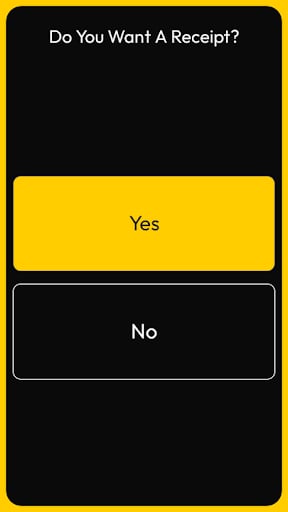
* Prompt the user for receipt preferences, such as "Would you like a printed receipt?"
* Offer quick prompts for additional services, like "Add a car wash for \$5.00?"
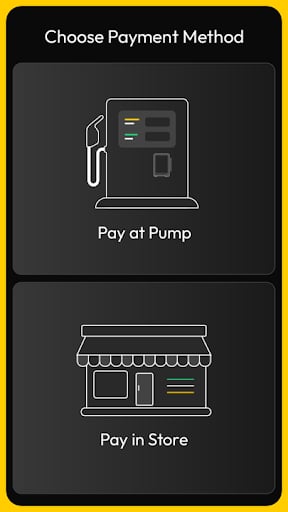
Examples of the two-choice option prompts on a Nayax device:
## Requests
The request requires a `title` and the text for the specific prompt. You can customize the labels of the two buttons to fit your specific use case.
The following example shows a typical request:
```json theme={null}
{
"command": "displayConfirm",
"requestId": "req-010",
"data": {
"title": "Do You Want A Receipt?",
"yesLabel": "Pay at pump",
"noLabel": "Pay in store",
"yesImage": "payatpump",
"noImage": "payinstore"
}
}
```
### Parameter Definitions
The table below describes the parameters available for this request:
| Name | Type | Required | Description |
| :--------------- | :----- | :------- | :--------------------------------------------------------------- |
| **command** | string | Yes | Set to `"displayConfirm"`. |
| **requestId** | string | Yes | A unique identifier for tracking the response. |
| **title** | string | Yes | The header text displayed at the top of the confirmation box. |
| **message** | string | Yes | The specific question or prompt text shown to the user. |
| **confirmLabel** | string | No | The text for the affirmative button (Defaults to "Yes" or "OK"). |
| **cancelLabel** | string | No | The text for the negative button (Defaults to "No" or "Cancel"). |
This is a **text only** request example:
```json theme={null}
{
"command": "displayConfirm",
"requestId": "req-010",
"data": {
"title": "Confirm Amount",
"yesLabel": "Confirm",
"noLabel": "Cancel"
}
}
```
This is an **image only** request example:
```json theme={null}
{
"command": "displayConfirm",
"requestId": "req-011",
"data": {
"title": "Choose Payment Method",
"yesImage": "payatpump",
"noImage": "payinstore"
}
}
```
This is a **text and image** request example:
```json theme={null}
{
"command": "displayConfirm",
"requestId": "req-012",
"data": {
"title": "Select Service",
"yesLabel": "Pay at Pump",
"noLabel": "Pay in Store",
"yesImage": "payatpump",
"noImage": "payinstore"
}
}
```
## Responses
The terminal returns the user's choice immediately after a button is pressed.
The following example shows a typical response:
```json theme={null}
{
"requestId": "req-010",
"data": {
"selectedIndex": 0
}
}
```
### Response Parameters
The `data` object contains the outcome of the confirmation prompt:
| Name | Type | Description |
| :------------ | :------ | :--------------------------------------------------------------------------------- |
| **confirmed** | boolean | Returns `true` if the user selected the affirmative button, and `false` otherwise. |
| **state** | string | Returns `COMPLETED` upon a button press or `CANCELLED` if the user timed out. |